Introduction of the decision-making statement

In C programming, decision-making statements are used to make choices based on certain conditions. These statements allow a program to take different actions depending on the outcome of a condition (true or false). This is an essential part of writing logical and interactive programs. Here are the main types of decision-making statements in C:

1. if Statement: 

An if statement is a conditional control structure used in programming to execute a block of code only if a specified condition is true. It helps make decisions in a program. 

Syntax:

if (condition) {
// Code to execute if the condition is true
}

Example in C:

int age = 18;
if (age >= 18) {
printf("You are eligible to vote.");
}
Flow chart of an if statement
decision-making statements: Flow chart of if statement
Flow chart of if statement

Write a program to read a number from the user and test whether the number is negative or positive.

#include<stdio.h>
#include<conio.h>
int main() {
int number;
// Ask the user to enter an integer number
printf("Enter an integer number:");
scanf("%d", &number);
// Check if the number is negative
if (number < 0) {
printf("The number is negative.\n");
}
else{
printf("The given number is positive.")
}
return 0;
}
2. Nested If Statement:

A nested if statement is an if statement inside another if statement. It allows you to make decisions within other decisions. This is useful when you need to check multiple conditions, one inside another.

Syntax:

if(condition){
if(condition){
//body
}
}

Flow chart of nested if statement

Fig.: Flow chart of nested if statement
#include<stdio.h>
int main() {
int age = 70;
if (age >= 18) {
printf("You are eligible to vote.\n");
if (age >= 60) {
printf("You are also a senior citizen.\n");
}
}
return 0;
}

Write a C program to check if a student has passed an exam and if they are eligible for a scholarship.

  • A student passes if their marks are greater than or equal to 40.
  • A student is eligible for a scholarship only if they pass and their marks are greater than or equal to 90.
#include <stdio.h>
int main() {
int marks;
// Ask user for marks
printf("Enter your marks: ");
scanf("%d", &marks);
if (marks >= 40) {
printf("You have passed the exam.\n");
if (marks >= 90) {
printf("Congratulations! You are eligible for a scholarship.\n");
}
}
return 0;
}
3. if-else statement :

The A if-elsestatement in C is used to execute one block of code if a condition is true, and another block of code if the condition is false. It helps you make informed decisions in your program.

syntax

if (condition) {
// code to run if condition is true
} else {
// code to run if condition is false
}
Flow chart of if else statement
Flow chart of if-else statement

Write a program to read a number from the user and determine whether the number is even or odd.

#include<stdio.h>
int main() {
int number;
printf("Enter a number: ");
scanf("%d", &number);
if (number % 2 == 0) {
printf("The number is even.\n");
} else {
printf("The number is odd.\n");
}
return 0;
}
4. Nested if-else Statement: 

A nested if-else statement means using one if or else if or else block inside anotheriforelseblock. It is helpful to test multiple conditions in a structured manner.

Syntax of Nested if-else in C

if (condition1) {
if(condition2)
{
statement-1;
}
else{
statement-2;
}
}
else {
if(condition3){
statement-3;
}
else
{
statement-4;
}
}

Flowchart of nested if-else statement

Write a program to read three numbers from the user and determine the largest number among them.

#include <stdio.h>
int main() {
int num1, num2, num3;
// Input from user
printf("Enter first number: ");
scanf("%d", &num1);
printf("Enter second number: ");
scanf("%d", &num2);
printf("Enter third number: ");
scanf("%d", &num3);
// Nested if-else to find the largest
if (num1 >= num2) {
if (num1 >= num3) {
printf("The largest number is: %d\n", num1);
} else {
printf("The largest number is: %d\n", num3);
}
} else {
if (num2 >= num3) {
printf("The largest number is: %d\n", num2);
} else {
printf("The largest number is: %d\n", num3);
}
}
return 0;
}
Switch Statement in C

The switch statement in C is a type of decision-making statement that allows a variable to be tested for equality against multiple constant values. Each value is called a case, and the variable is checked against each case. It is often used as a cleaner alternative to using multiple if .. else…if  statements.

syntax:

switch (expression) {
case constant1:
// code to execute if expression == constant1
break;
case constant2:
// code to execute if expression == constant2
break;
// you can have any number of cases
default:
// code to execute if no case matches
}
switch statement
Flow chart of switch statement

Write a C program to print the day of the week based on user input (1 to 7). Use a switch statement.

#include <stdio.h>
int main() {
int day;
printf("Enter day number (1 to 7): ");
scanf("%d", &day);
switch (day) {
case 1:
printf("Sunday");
break;
case 2:
printf("Monday");
break;
case 3:
printf("Tuesday");
break;
case 4:
printf("Wednesday");
break;
case 5:
printf("Thursday");
break;
case 6:
printf("Friday");
break;
case 7:
printf("Saturday");
break;
default:
printf("Invalid day number");
}
return 0;
}

Write a C program to perform a basic calculator using a switch statement.

#include <stdio.h>
int main() {
char operator;
float num1, num2;
printf("Enter an operator (+, -, *, /): ");
scanf(" %c", &operator);
printf("Enter two numbers: ");
scanf("%f %f", &num1, &num2);
switch (operator) {
case '+':
printf("Result = %.2f", num1 + num2);
break;
case '-':
printf("Result = %.2f", num1 - num2);
break;
case '*':
printf("Result = %.2f", num1 * num2);
break;
case '/':
if (num2 != 0)
printf("Result = %.2f", num1 / num2);
else
printf("Division by zero is not allowed.");
break;
default:
printf("Invalid operator.");
}
return 0;
}

Write a C program to check whether a character is a vowel or a consonant using the switch statement.

#include <stdio.h>
int main() {
char ch;
printf("Enter a character: ");
scanf(" %c", &ch);
switch (ch) {
case 'a':
case 'e':
case 'i':
case 'o':
case 'u':
case 'A':
case 'E':
case 'I':
case 'O':
case 'U':
printf("Vowel");
break;
default:
printf("Consonant");
}
return 0;
}

Loop Statements in Programming

Loop statements are used to execute a block of code repeatedly as long as a certain condition is true. They help reduce redundancy and make code efficient.

Types of Loop Statements
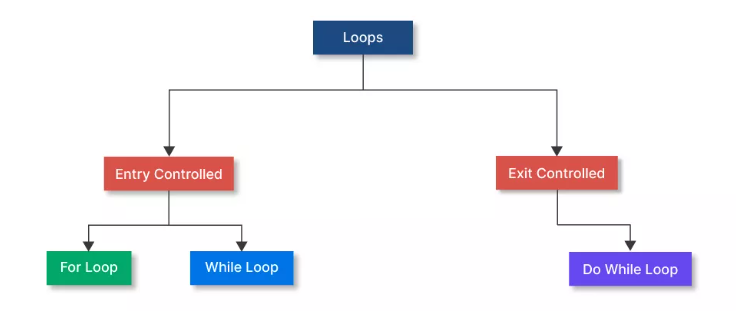
Fig: Classification of Loop

Entry control loop: An Entry Controlled Loop is a type of loop where the condition is checked before the execution of the loop body. If the condition is false at the beginning, the loop does not run even once. Examples of entry-controlled loops are For and While loops.

for Loop

  • A for loop is an entry-controlled loop used to execute a block of code repeatedly for a known number of times. It is commonly used when the number of iterations is fixed. The syntax of the for loop is 

for(initialization; condition; increment/decrement) {
// Code to be executed
}

Initialization means setting the starting value of the loop counter, and conditional means the loop runs as long as this condition is met, and increments/decrements means changes the loop counter after each iteration

The flow chart for a for loop is shown in the diagram below.

Flow chart of for loop
Flow chart of a for loop

Example: Print numbers from 1 to 5 by using a for loop

#include <stdio.h>
int main() {
int i;
for(i = 1; i <= 5; i++) {
printf("%d ", i);
}
return 0;
}
Out Put of program:
1 2 3 4 5

While loop:

A while loop in C is an entry-controlled loop that repeatedly executes a block of code as long as a given condition is true. The condition is checked before the loop body runs. Syntax of while loop:

while (condition) {
// Code to be executed repeatedly
}
While loop flow chart

Example: Print numbers from 1 to 5 using a while loop

#include <stdio.h>
int main() {
int i = 1;
while (i <= 5) {
printf("%d\n", i);
i++;
}
return 0;
}

Exit Controlled Loop: An Exit Controlled Loop is a type of loop where the condition is checked after the execution of the loop body. So, the loop executes at least once, even if the condition is false at the beginning.

do…while Loop in C: A do-while loop is an exit-controlled loop in C programming. This means that the loop body will execute at least once, and then the condition is checked. If the condition is true, the loop continues; otherwise, it stops.

syntax

do {
// Statements to execute
} while (condition);

The flow chart of do while loop is shown in the diagram below.
Do-While loop

Comparison between for loop and the while loop 

Featurefor Loopwhile Loop
DefinitionEntry-controlled loop for a known number of iterations.Entry-controlled loop for an unknown number of iterations.
Syntaxfor(initialization; condition; update) { ... }while(condition) { ... }
InitializationInside the loop header (executed once at the start).Must be done before the loop.
Condition CheckBefore every iteration.Before every iteration.
Update (Increment/Decrement)Automatically done after each iteration (inside the loop header).Must be done manually inside the loop body.
Use CaseBest for fixed iterations (e.g., arrays, ranges, counters).Best for dynamic conditions (e.g., user input, event-based looping).
Loop ControlCompact—initialization, condition, and update in one line.More flexible—condition is separate from initialization and update.
ReadabilityMore readable for counting-based loops.More readable for condition-based loops.
TerminationEnds when the counter meets the condition.Ends when the condition becomes false.
Zero Iterations?Yes (if the condition is false initially).Yes (if the condition is false initially).
Risk of Infinite LoopLower (if the update is correctly defined).Higher (if the condition never becomes false).

 Comparison between while loop and do-while loop

Featurewhile Loopdo-while Loop
DefinitionEntry-controlled loop.Exit-controlled loop.
Syntaxwhile(condition) { ... }do { ... } while(condition);
Condition CheckBefore executing the loop body.After executing the loop body.
Minimum ExecutionsMay not execute at all if the condition is false initially.Executes at least once, even if the condition is false.
Use CaseWhen the loop should run only if the condition is true.When the loop must run at least once, regardless of the condition.
Common UsageValidating input before processing.Menu-driven programs, rechecking conditions after one run.
ReadabilityGood for loops with pre-check conditions.Useful for post-processing scenarios.
Examplewhile(x < 5) { x++; }do { x++; } while(x < 5);
Loop Control TypeEntry-controlledExit-controlled

Write a C program that prints the Multiplication Table using for loop.

#include <stdio.h>
int main() {
int n, i;
printf("Enter a number: ");
scanf("%d", &n);
for (i = 1; i <= 10; i++) {
printf("%d × %d = %d\n", n, i, n * i);
}
return 0;
}

Write a C program that takes a positive integer from the user and calculates its factorial using a for loop. Display the result at the end.

#include <stdio.h>
int main() {
int num, i;
unsigned long long fact = 1;
printf("Enter a positive integer: ");
scanf("%d", &num);
for (i = 1; i <= num; i++) {
fact *= i;
}
printf("Factorial of %d = %llu\n", num, fact);
return 0;
}

Write a C program to reverse the digits of an integer using a while loop. For example, if the user enters 12345, the output should be 54321.

#include <stdio.h>
int main() {
long num, rev = 0;
printf("Enter an integer: ");
scanf("%ld", &num);
while (num != 0) {
rev = rev * 10 + num % 10;
num = num / 10;
}
printf("Reversed number = %ld\n", rev);
return 0;
}

Create a simple menu-driven calculator using a do-while loop in C. The program should allow the user to:

  • Add
  • Subtract
  • Multiply
  • Divide

Ask the user to enter two numbers, perform the operation, and repeat the menu until the user chooses to exit.

#include <stdio.h>
int main() {
int choice;
double a, b;
do {
printf("\n--- Calculator Menu ---\n");
printf("1. Add\n2. Subtract\n3. Multiply\n4. Divide\n0. Exit\n");
printf("Enter your choice: ");
scanf("%d", &choice);
if (choice >= 1 && choice <= 4) {
printf("Enter two numbers: ");
scanf("%lf %lf", &a, &b);
}
switch (choice) {
case 1: printf("Result = %.2lf\n", a + b); break;
case 2: printf("Result = %.2lf\n", a - b); break;
case 3: printf("Result = %.2lf\n", a * b); break;
case 4:
if (b != 0)
printf("Result = %.2lf\n", a / b);
else
printf("Error: Cannot divide by zero!\n");
break;
case 0: printf("Exiting program.\n"); break;
default: printf("Invalid choice! Please try again.\n");
}
} while (choice != 0);
return 0;
}

Write a C program using a while loop that repeatedly takes integers from the user. Count how many of them are positive, negative, or zero. The loop should stop when the user enters 999.

#include <stdio.h>
int main() {
int num, pos = 0, neg = 0, zero = 0;
printf("Enter numbers (999 to stop):\n");
scanf("%d", &num);
while (num != 999) {
if (num > 0)
pos++;
else if (num < 0)
neg++;
else
zero++;
scanf("%d", &num);
}
printf("\nTotal Positive: %d\n", pos);
printf("Total Negative: %d\n", neg);
printf("Total Zeros: %d\n", zero);
return 0;
}

Jump Statements 

A jump statement in C is used to alter the flow of control by transferring it to another part of the program. Instead of executing statements sequentially, jump statements “jump” to a specific location, either within the same function or outside of it (in limited cases).

There are four types of jumps statements and these are break statement, continous ststement, goto statement, and return statement

  1. Break Statement :The break statement is used to immediately exit from a loop (for, while, do-while) or a switch statement in C programming.The syntax of break statement is break;

Example 1: Using break in a loop

#include <stdio.h>
int main() {
for(int i = 1; i <= 5; i++) {
if(i == 3) {
break;
}
printf("%d\n", i);
}
return 0;
}

WAP a program to determine whether a number is prime or not,and use break statemnt

#include <stdio.h>
int main() {
int num, i;
int isPrime = 1; // Assume number is prime
printf("Enter a positive number: ");
scanf("%d", &num);
if (num <= 1) {
isPrime = 0; // 0 and 1 are not prime numbers
} else {
for (i = 2; i < num; i++) {
if (num % i == 0) {
isPrime = 0; // Not a prime number
break; // Exit the loop early
}
}
}
if (isPrime) {
printf("%d is a Prime number.\n", num);
} else {
printf("%d is NOT a Prime number.\n", num);
}
return 0;
}

2 Continue Statement : The continue statement in C is used to skip the current iteration of a loop and jump to the next iteration, without executing the remaining statements in the loop body for that cycle. The syntax of continue statement is:  continue;

Example: Using continue in a for loop

#include <stdio.h>
int main() {
for (int i = 1; i <= 5; i++) {
if (i == 3) {
continue; // Skip when i is 3
}
printf("%d\n", i);
}
return 0;
}

3.Goto Statement:The goto statement is used to jump unconditionally from one part of the program to another using a label. It can transfer control to any part of the same function. 

syntax

goto label_name;
// ...
label_name:
// code to execute

Example of goto statement:

#include <stdio.h>
int main() {
int num = 5;
if (num > 0) {
goto positive;
}
printf("This will not print.\n");
positive:
printf("Number is positive.\n");
return 0;
}

4. Return Statement: The returnstatement is used to end the execution of a function and optionally send a value back to the part of the program that called the function.Syntax is

return expression; // For functions that return a value
return; // For void functions

Example 1: Function returning a value

#include <stdio.h>
int sum(int a, int b) {
return a + b; // Returns the sum to the caller
}
int main() {
int result = sum(5, 3);
printf("Sum is %d\n", result);
return 0;
}

Important programs 

  1. WAP C program to read a character from the keyboard and convert it to uppercase if it is lowercase, and to lowercase if it is uppercase.
#include <stdio.h>
int main() {
char ch;
// Read a character from the user
printf("Enter a character: ");
scanf("%c", &ch);
// Check and convert
if (ch >= 'a' && ch <= 'z') {
// If lowercase, convert to uppercase
ch = ch - 32;
printf("Converted to Uppercase: %c\n", ch);
} else if (ch >= 'A' && ch <= 'Z') {
// If uppercase, convert to lowercase
ch = ch + 32;
printf("Converted to Lowercase: %c\n", ch);
} else {
// Not an alphabet
printf("Not an alphabet character.\n");
}
return 0;
}
error: Content is protected !!
Scroll to Top