
Introduction
Computer networking is an essential part of modern information technology. It allows computers, smartphones, servers, printers and other digital devices to communicate and share information with each other. Computer networks are widely used in homes, schools, colleges, offices, hospitals, banks and industries.
A computer network can be classified into different types based on its geographical coverage area, size, purpose and communication structure. The major types of computer networks include Personal Area Network (PAN), Local Area Network (LAN), Metropolitan Area Network (MAN) and Wide Area Network (WAN).
Similarly, network topology describes how computers and other networking devices are physically or logically arranged in a network. Common network topologies include Bus, Star, Ring, Mesh, Tree and Hybrid topology.
In this article, we will explore the different types of computer networks and network topologies, their features, examples, advantages, disadvantages and real-world applications.
1. What is a Computer Network?
A computer network is a group of two or more interconnected computers and other digital devices that communicate with each other to exchange information and share resources through wired or wireless communication media.
A network allows users to share files, printers, internet connections, applications and other resources efficiently.
Examples of computer networks:
- Computers connected in a school computer laboratory.
- Smartphones connected through a Wi-Fi router.
- Computers sharing files in an office.
- Bank branches connected through a communication network.
- Websites and online services accessed through the Internet.
2. Types of Computer Networks
Computer networks are classified into several types according to their geographical coverage area.
The four major types are:
- Personal Area Network (PAN)
- Local Area Network (LAN)
- Metropolitan Area Network (MAN)
- Wide Area Network (WAN)
2.1 Personal Area Network (PAN)
A Personal Area Network (PAN) is a small computer network used to connect personal digital devices within a limited area, usually around an individual. PAN generally covers a few meters and is commonly used for communication between personal devices.
Features of PAN:
- Covers a very small geographical area.
- Connects personal electronic devices.
- Usually uses Bluetooth, USB or wireless technologies.
- Easy to establish and manage.
- Suitable for personal communication and data sharing.
Examples of PAN:
- Connecting a smartphone to wireless earbuds.
- Connecting a laptop to a Bluetooth mouse.
- Sharing files between nearby smartphones.
- Connecting a smartwatch to a mobile phone.
Advantages of PAN:
- Easy to set up.
- Low installation cost.
- Convenient for personal use.
- Supports wireless communication.
- Requires relatively little infrastructure.
Disadvantages of PAN:
- Covers a limited geographical area.
- May have lower data transfer speeds depending on technology.
- Can experience wireless interference.
- Security risks may occur if connections are not properly protected.
2.2 Local Area Network (LAN)
A Local Area Network (LAN) is a computer network that connects computers and other digital devices within a small geographical area, such as a home, school, office, computer laboratory or building.LAN is commonly used to share files, printers, applications and internet connections among connected devices.
Features of LAN:
- Covers a limited geographical area.
- Usually provides high-speed data communication.
- Commonly uses Ethernet cables and Wi-Fi.
- Generally owned and managed by an individual or organization.
- Allows resource sharing among connected devices.
Examples of LAN:
- Computers connected in a school computer laboratory.
- Office computers connected to a central network.
- Home devices connected through a Wi-Fi router.
- Computers in a college library.
Advantages of LAN:
- High-speed data communication.
- Easy sharing of files and resources.
- Centralized data management.
- Cost-effective for connecting devices in a small area.
- Easy communication between connected computers.
Disadvantages of LAN:
- Limited geographical coverage.
- Requires network installation and maintenance.
- Network failure can affect connected users.
- Security risks may occur without proper protection.
- Network performance can decrease when heavily loaded.
2.3 Metropolitan Area Network (MAN)
A Metropolitan Area Network (MAN) is a computer network that connects multiple Local Area Networks (LANs) across a city or a large metropolitan area. MAN covers a larger geographical area than LAN but generally a smaller area than WAN. It is commonly used by government organizations, universities, businesses and service providers.
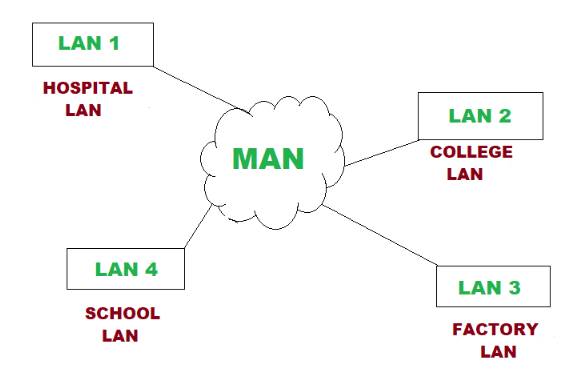
Features of MAN:
- Covers a city or metropolitan area.
- Connects multiple LANs.
- Uses high-capacity communication links.
- Can be operated by organizations or telecommunications service providers.
- Supports communication between geographically separated locations within a metropolitan area.
Examples of MAN:
- Connecting different branches of a university within a city.
- Connecting government offices across a metropolitan area.
- City-wide communication networks.
- Metropolitan broadband infrastructure.
Advantages of MAN:
- Connects multiple LANs across a city.
- Supports high-speed communication.
- Allows centralized resource sharing.
- Suitable for large organizations.
- Provides communication between different locations.
Disadvantages of MAN:
- More expensive than a typical LAN.
- Requires specialized infrastructure.
- Network management can be complex.
- Security and maintenance require proper planning.
2.4 Wide Area Network (WAN)
A Wide Area Network (WAN) is a computer network that connects computers and smaller networks over large geographical areas, such as countries, continents or the entire world.
WAN uses communication technologies such as leased lines, fiber-optic cables, satellite links and other telecommunications infrastructure.
The Internet is the largest and most widely used example of a WAN, although it is more accurately described as a global network of interconnected networks.
Features of WAN:
- Covers a very large geographical area.
- Connects multiple LANs and MANs.
- Uses various communication technologies.
- May be managed by multiple organizations and service providers.
- Supports long-distance data communication.
Examples of WAN:
- The Internet.
- Banking networks connecting branches across different countries.
- Multinational company networks.
- Airline reservation systems connecting international offices.
Advantages of WAN:
- Supports communication over long distances.
- Connects offices in different geographical locations.
- Enables centralized data access.
- Supports international business operations.
- Provides access to global information and services.
Disadvantages of WAN:
- Expensive to establish and maintain.
- Requires specialized network infrastructure.
- Security management can be challenging.
- Network performance depends on communication links and service providers.
- Troubleshooting can be complex.
2.5 Campus Area Network (CAN)
A Campus Area Network (CAN) is a computer network that connects multiple Local Area Networks (LANs) within a limited geographical area, such as a university, college, school or large organizational campus.
It allows computers, laboratories, libraries, administrative offices and other departments to communicate and share resources with each other.
Features of CAN:
- Covers a campus or a group of nearby buildings.
Connects multiple LANs.
Usually owned and managed by a single organization.
Uses wired and wireless communication technologies.
Supports resource sharing and centralized network management.
Examples of CAN:
- Connecting computer laboratories, libraries and administrative offices within a university.
- Connecting different departments of a college.
- Connecting buildings within a school campus.
Advantages of CAN:
- Allows communication between different departments.
- Supports sharing of files, printers and internet connections.
- Provides centralized network management.
- Offers efficient data communication within a campus.
- Reduces the need for separate network infrastructure in each building.
Disadvantages of CAN:
- Requires installation and maintenance costs.
- Network management can be complex.
- Requires skilled technical personnel.
- Network failure may affect multiple buildings.
- Security must be properly managed.
3. Comparison Between LAN and MAN
| LAN (Local Area Network) | MAN (Metropolitan Area Network) |
|---|---|
| Covers a small geographical area. | Covers a city or metropolitan area. |
| Connects computers within a home, school or office. | Connects multiple LANs across a city. |
| Has a smaller network size. | Has a larger network size than LAN. |
| Generally provides high-speed communication. | Speed depends on technology and infrastructure. |
| Usually owned by an individual or organization. | Often managed by service providers or organizations. |
| Requires relatively low installation costs. | Requires relatively high installation costs. |
| Easy to install and maintain. | More complex to install and maintain. |
| Data communication takes place within a limited area. | Data communication takes place between different locations across a city. |
| Security management is relatively simple. | Requires more complex security management. |
| Uses Ethernet and Wi-Fi technologies. | Uses fiber-optic links, Metro Ethernet and other technologies. |
| Example: School computer laboratory. | Example: Network connecting different college branches across a city. |
Comparison Between LAN and WAN
LAN (Local Area Network) | WAN (Wide Area Network) |
|---|---|
Covers a small geographical area. | Covers a large geographical area. |
Connects computers within a home, school or office. | Connects computers and networks across countries and continents. |
Has a smaller network size. | Has a larger network size. |
Generally provides high-speed communication. | Speed depends on communication technology and infrastructure. |
Usually owned by an individual or organization. | Often involves multiple organizations and service providers. |
Requires relatively low installation costs. | Requires relatively high installation costs. |
Easy to install and maintain. | More complex to install and maintain. |
Data communication takes place within a limited area. | Data communication takes place over long distances. |
Security management is relatively simple. | Requires more complex security management. |
Uses Ethernet and Wi-Fi technologies. | Uses fiber-optic cables, satellite links, leased lines and other technologies. |
Example: School computer laboratory. | Example: The Internet and international banking networks. |
Comparison Between MAN and WAN
MAN (Metropolitan Area Network) | WAN (Wide Area Network) |
|---|---|
Covers a city or metropolitan area. | Covers a large geographical area, such as countries and continents. |
Connects multiple LANs within a city. | Connects multiple LANs and MANs over large distances. |
Has a medium geographical coverage area. | Has a very large geographical coverage area. |
Generally provides high-speed communication within a metropolitan area. | Speed depends on communication technology and infrastructure. |
Often managed by service providers or organizations. | Often involves multiple organizations and service providers. |
Requires relatively high installation costs. | Generally requires higher infrastructure and maintenance costs. |
Less complex than WAN. | More complex to install and manage. |
Data communication takes place within a city. | Data communication takes place over long distances. |
Uses fiber-optic cables, Metro Ethernet and other technologies. | Uses fiber-optic cables, satellite links, leased lines and other technologies. |
Example: Network connecting different college branches across a city. | Example: The Internet and international banking networks. |
4. What is Network Topology?
Network topology refers to the physical or logical arrangement of computers, network devices and communication links in a computer network.It describes how devices are connected and how data travels between them.
Network topology plays an important role in network installation, communication efficiency, reliability, scalability and maintenance.
There are two main aspects of network topology:
Physical Topology: It describes the actual physical arrangement of computers, cables, switches and other networking devices.
Logical Topology: It describes how data flows between devices in a network, regardless of their physical arrangement.
5. Types of Network Topology
Different network topologies are used according to the requirements, size, cost and purpose of a computer network.
The six commonly studied network topologies are:
- Bus Topology
- Star Topology
- Ring Topology
- Mesh Topology
- Tree Topology
- Hybrid Topology
5.1 Bus Topology
Bus topology is a network arrangement in which all computers and other network devices are connected to a single main communication cable called the backbone cable.
Data travels along the shared communication cable. In traditional bus networks, terminators are placed at both ends of the backbone to prevent signal reflections.

Features of Bus Topology:
- All devices share a common backbone cable.
- Data travels through the shared communication medium.
- Terminators are used at both ends in traditional implementations.
- Requires less cabling than some other topologies.
- Suitable for small and simple network installations.
Advantages of Bus Topology:
- Simple network design.
- Requires less cable.
- Relatively inexpensive to install.
- Easy to understand and implement.
- Suitable for small networks.
Disadvantages of Bus Topology:
- Backbone cable failure can stop the entire network.
- Performance decreases as network traffic increases.
- Troubleshooting can be difficult.
- Limited cable length and number of connected devices.
- Data transmission may experience collisions in traditional shared Ethernet implementations.
5.2 Star Topology
Star topology is a network arrangement in which all computers and other devices are connected to a central networking device, such as a switch or hub.All communication between connected devices passes through the central device.

Star topology is widely used in modern Ethernet LANs because it is easy to install, manage and troubleshoot.
Features of Star Topology:
- All devices connect to a central switch or hub.
- Each device generally has a separate connection to the central device.
- Easy to add or remove devices.
- Commonly used in modern LAN environments.
- Centralized network management.
Advantages of Star Topology:
- Easy to install and manage.
- Failure of one device or its individual cable generally does not affect other devices.
- Easy to identify network problems.
- Simple to expand by connecting additional devices.
- Provides good performance with suitable switches.
Disadvantages of Star Topology:
- Failure of the central switch or hub can interrupt the entire network.
- Requires more cable than bus topology.
- Installation cost may be higher.
- Network performance depends on the capacity of the central device.
5.3 Ring Topology
Ring topology is a network arrangement in which each computer is connected to two neighboring computers, forming a closed circular communication path.
Data travels from one device to another around the ring. Depending on the technology, data may travel in one direction or both directions.
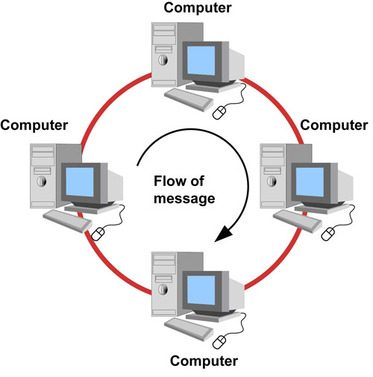
Features of Ring Topology:
- Devices are connected in a circular arrangement.
- Each device connects to neighboring devices.
- Data passes through intermediate devices.
- Some implementations use token-passing mechanisms.
- Communication follows an organized path.
Advantages of Ring Topology:
- Provides organized data transmission.
- Token-based systems can reduce data collisions.
- Predictable access to the communication medium in token-based implementations.
- Can perform efficiently under suitable network conditions.
Disadvantages of Ring Topology:
- Failure of a device or link can disrupt a basic single-ring network.
- Adding or removing devices may interrupt communication.
- Troubleshooting can be difficult.
- Network maintenance can be complex.
5.4 Mesh Topology
Mesh topology is a network arrangement in which devices are connected through multiple communication links.In a full mesh topology, every device has a direct connection to every other device. In a partial mesh topology, only selected devices have multiple direct connections.
Mesh topology provides alternative communication paths when a connection fails.

Features of Mesh Topology:
- Provides multiple communication paths.
- Can be designed as full or partial mesh.
- Offers high redundancy.
- Improves network reliability.
- Suitable for networks requiring continuous communication.
Advantages of Mesh Topology:
- High reliability and fault tolerance.
- Multiple alternative communication paths.
- Failure of one link may not interrupt the entire network.
- Supports reliable communication.
- Suitable for critical network infrastructure.
Disadvantages of Mesh Topology:
- Expensive to install.
- Requires more cables and network ports.
- Complex network configuration.
- Difficult to manage in large full-mesh networks.
- Requires more resources than simpler topologies.
5.5 Tree Topology
Tree topology is a hierarchical network arrangement that combines characteristics of star and bus topologies. In this topology, devices are arranged in different levels. A central backbone or root connection connects multiple network segments, and each segment may contain additional connected devices.

Features of Tree Topology:
- Uses a hierarchical structure.
- Combines characteristics of star and bus arrangements.
- Supports multiple network segments.
- Suitable for expanding large networks.
- Allows centralized network organization.
Advantages of Tree Topology:
- Easy to expand.
- Supports large networks.
- Provides hierarchical management.
- Network segments can be managed separately.
- Suitable for organizations with multiple departments.
Disadvantages of Tree Topology:
- Requires more cabling.
- Installation can be expensive.
- Failure of an important backbone or upper-level device can affect multiple network segments.
- Configuration and maintenance can be complex.
5.6 Hybrid Topology
Hybrid topology is a network arrangement that combines two or more different network topologies, such as star, bus, ring or mesh.It is designed according to the communication and infrastructure requirements of an organization.
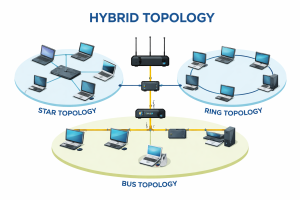
Features of Hybrid Topology:
- Combines multiple network topologies.
- Flexible network design.
- Suitable for large organizations.
- Supports network expansion.
- Can provide reliability through suitable design.
Advantages of Hybrid Topology:
- Flexible and scalable.
- Can be customized according to organizational needs.
- Combines the benefits of different topologies.
- Supports complex network structures.
- Can improve reliability when designed with redundancy.
Disadvantages of Hybrid Topology:
- Expensive to install.
- Requires careful planning.
- Complex network management.
- Troubleshooting may require specialized knowledge.
- Maintenance can be costly.
6. Comparison of Different Network Topologies
| Topology | Structure | Main advantage | Main disadvantage |
|---|---|---|---|
| Bus | Single backbone cable | Less cabling | Backbone failure affects network |
| Star | Central device | Easy management | Central device failure |
| Ring | Circular arrangement | Organized transmission | Link or device failure can disrupt basic ring |
| Mesh | Multiple connections | High reliability | High installation cost |
| Tree | Hierarchical structure | Easy expansion | Backbone dependency |
| Hybrid | Combination of topologies | Flexibility | Complex management |
7. Advantages of Computer Networks
Computer networks provide many benefits in homes, educational institutions, businesses and other organizations.
The major advantages include:
- Resource Sharing: Users can share printers, storage devices, applications and other resources.
- File Sharing: Information and documents can be exchanged between connected computers.
- Communication: Users can communicate through email, messaging, video conferencing and other online services.
- Internet Sharing: Multiple devices can access the Internet through a shared connection.
- Centralized Management: Organizations can manage information and network resources centrally.
- Data Access: Authorized users can access shared information from different locations.
- Cost Reduction: Resource sharing can reduce the need for separate hardware and infrastructure.
- Collaboration: Teams can work together using shared applications and online platforms.
8. Disadvantages of Computer Networks
Although computer networks provide many benefits, they also have some disadvantages.
- Security Risks: Networks may be affected by hacking, malware and unauthorized access.
- Installation Cost: Setting up network infrastructure can require significant investment.
- Maintenance: Networks require regular monitoring, maintenance and technical support.
- Network Failure: Hardware or communication link failures can interrupt services.
- Virus and Malware: Malicious software can spread between connected devices.
- Privacy Issues: Improper access control can expose confidential information.
- Dependency: Users may become dependent on network connectivity for daily activities.
9. Applications of Computer Networks
Computer networks are used in almost every field of modern life.
1. Education
Schools, colleges and universities use computer networks for online learning, digital classrooms, sharing study materials, online examinations and accessing educational resources.
2. Banking
Banks use computer networks to connect branches, ATMs, payment systems and online banking services.
3. Business
Organizations use networks for communication, file sharing, employee collaboration, data management and business operations.
4. Healthcare
Hospitals and healthcare institutions use networks to access patient records, manage appointments, share medical information and support digital healthcare services.
5. Communication
Computer networks support email, instant messaging, voice calls, video conferencing and social networking.
6. E-commerce
Online shopping platforms use computer networks to connect customers, sellers, payment systems and delivery services.
7. Government
Government organizations use networks to provide digital services, manage records and communicate between departments.
8. Entertainment
Computer networks support online gaming, video streaming, music streaming and digital content sharing.
10. Frequently Asked Questions (FAQs)
Q1. What are the four main types of computer networks?
The four main types of computer networks are Personal Area Network (PAN), Local Area Network (LAN), Metropolitan Area Network (MAN) and Wide Area Network (WAN).
Q2. What is the difference between LAN and WAN?
LAN covers a small geographical area, such as a home, school or office, whereas WAN connects networks over large geographical areas, such as countries and continents.
Q3. What is network topology?
Network topology refers to the physical or logical arrangement of computers, network devices and communication links in a computer network.
Q4. What are the six main types of network topology?
The six commonly studied network topologies are Bus, Star, Ring, Mesh, Tree and Hybrid topology.
Q5. Which network topology is commonly used in schools and offices?
Star topology is commonly used in schools and offices because it is easy to install, manage, expand and troubleshoot.
Q6. Which network topology is the most reliable?
Mesh topology can provide high reliability because it offers multiple communication paths. However, actual reliability depends on network design and implementation.
Q7. What is the difference between physical and logical topology?
Physical topology describes the actual physical arrangement of network devices and cables, whereas logical topology describes how data travels between devices.
Q8. What is the largest example of a WAN?
The Internet is the largest and most widely used example of a WAN, although technically it is a global network of interconnected networks.
Q9. What is the main purpose of computer networking?
The main purpose of computer networking is to enable communication, information exchange and resource sharing between connected devices.
Q10. What is the difference between bus and star topology?
In bus topology, all devices share a single backbone cable, whereas in star topology, all devices connect to a central networking device such as a switch.
Conclusion
Computer networks are an important part of modern communication and information technology. They allow devices to communicate, exchange information and share resources efficiently.
PAN, LAN, MAN and WAN are the major types of computer networks, classified according to their geographical coverage area. Similarly, Bus, Star, Ring, Mesh, Tree and Hybrid are common network topologies that describe how devices are connected and how communication is organized.
Understanding network types and topologies helps students, IT professionals and beginners learn the fundamentals of computer networking and select suitable network structures for different applications.
Whether it is a small home network, a school computer laboratory, a business organization or a global communication system, computer networks play an essential role in connecting people and technology.
About the Author
Er. Basant Kumar Yadav is an Electronics and Communication Engineering graduate and an instructor at Shree Secondary School Dudhiawa, Rautahat, Nepal. He creates educational resources and computer engineering notes to help students understand technical concepts through simple explanations and practical examples.
Visit BasantYadav.com.np for more computer engineering notes, tutorials and educational resources.
Related Articles: