
Principles of Programming Class 9: Complete Notes
The Principles of Programming Class 9 chapter introduces students to the basic concepts of computer programming, programming languages, their applications, and program design tools. These concepts help students understand how computers execute instructions and how programmers develop solutions to different problems.
In this chapter, students will learn about programs, programmers, programming languages, software, categories of programming languages, scientific and business applications, algorithms, and flowcharts.
These notes are prepared in simple English for Class 9 Computer Engineering students in Nepal.
1.1 Introduction to Programming
Programming is the process of designing and writing instructions that a computer can execute to perform a specific task or solve a problem.A programmer uses a programming language to communicate instructions to a computer.
For example, a program can calculate the sum of two numbers, display a message, prepare a student’s result, or calculate the salary of an employee.
What is a Program?
A program is a set of instructions written in a programming language to perform a particular task. Examples of programs:
- A program to calculate the sum of two numbers.
- A program to calculate students’ examination results.
- A program to calculate an employee’s salary.
- A program to display the multiplication table of a number.
Example of a simple C program:
#include <stdio.h>
int main(void)
{
    printf("Hello, World!");
    return 0;
}
Output:
Hello, World!This program displays the message “Hello, World!” on the computer screen.
What is a Programmer?
A programmer is a person who designs, writes, tests, and maintains computer programs using programming languages.Programmers analyze problems and develop instructions that enable computers to perform specific tasks.
Examples of a programmer’s work:
- Developing websites and applications.
- Creating school management software.
- Developing games.
- Writing programs to solve mathematical problems.
- Testing and correcting errors in programs.
What is a Programming Language?
A programming language is a formal language used to write instructions that a computer can execute, directly or after translation by a compiler or interpreter.Programming languages provide rules, symbols, and keywords for writing computer programs.
Examples of programming languages:
- C
- C++
- Java
- Python
- JavaScript
For example, the following C statement displays a message:
printf("Welcome to Programming");What is Software?
Software is a collection of programs, procedures, and related data that instructs a computer to perform specific tasks.Software is generally classified into two major categories.
A. System Software
System software manages computer hardware and provides a platform for running application software. Examples:
- Operating systems such as Windows and Linux.
- Device drivers.
- Language translators such as compilers and interpreters.
- System utilities.
B. Application Software
Application software helps users perform specific tasks. Examples:
- Microsoft Word for document preparation.
- Microsoft Excel for calculations and data analysis.
- Accounting software for financial records.
- School management software for student information.
- Web browsers for accessing websites.
Difference Between Program and Software
| Program | Software |
|---|---|
| A program is a set of instructions for performing a task. | Software is a collection of programs and related components that provides functionality. |
| It may perform a single, specific task. | It may contain multiple programs and features. |
| It can be a component of software. | It may consist of many interconnected programs. |
Difference Between Programmer and Programming
| Programmer | Programming |
|---|---|
| A person who develops computer programs. | The process of developing computer programs. |
| It refers to a person or professional role. | It refers to an activity or process. |
| Example: A developer writing a C program. | Example: Writing, testing, and debugging that C program. |
1.2 Categories of Programming Languages
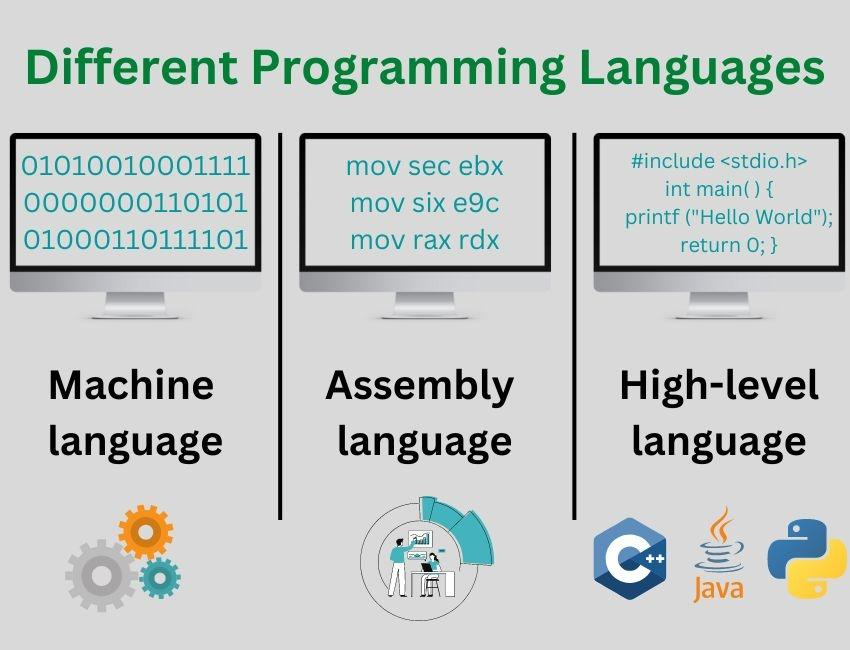
A programming language is used to write instructions for a computer. Programming languages can be classified into different categories according to their level and closeness to computer hardware. The two major categories based on language level are:
- Low-level programming languages
- High-level programming languages
A. Low-Level Programming Languages
Low-level programming languages are closer to the computer’s hardware and instruction set than high-level languages. They generally provide less abstraction from the underlying machine. Low-level languages include machine language and assembly language.
1. Machine Language
Machine language is a programming language consisting of binary digits (0s and 1s) that represent instructions understood directly by a computer’s processor.
Example of a simplified binary pattern:
10110000 01100001This is only an illustrative binary pattern, not a complete, universally meaningful instruction. The meaning of machine instructions depends on the processor architecture.
Advantages Low-Level Programming Languages:
- Instructions can be executed directly by the processor.
- It provides close control over hardware.
Disadvantages Low-Level Programming Languages:
- Difficult for humans to read and write.
- Errors can be difficult to identify.
- Machine instructions are architecture-specific.
2. Assembly Language
Assembly language uses symbolic instruction names and labels instead of requiring programmers to write every instruction as binary digits. An assembler translates assembly language into machine code.
Example:
MOV AX, 5This is an illustrative assembly instruction. Its meaning depends on the processor architecture and assembly syntax.
Advantages Assembly Language:
- Easier to read than raw machine code.
- Provides close control over hardware.
- Useful for certain low-level programming tasks.
Disadvantages Assembly Language:
- Requires knowledge of the processor architecture.
- Usually requires more detailed instructions than high-level programming.
- Programs are generally less portable between different processor architectures.
B. High-Level Programming Languages
High-level programming languages use syntax and structures designed to be more understandable to humans.
They allow programmers to develop programs without writing every machine-level instruction themselves.
Examples:
- C
- C++
- Java
- Python
JavaScript
Example of a high-level statement in C:
sum = a + b;This statement adds the values of a and b and assigns the result to sum.
Advantages High-level programming languages:
- Easier to learn and understand than machine language.
- Programs are generally easier to develop, test, and maintain.
- Many languages support portability across different platforms.
Disadvantages High-level programming languages:
- Programs generally need a compiler, interpreter, or another execution environment.
- Direct hardware control may be less straightforward than in low-level programming.
- Performance and resource use depend on the language, implementation, and program.
Difference Between Low-Level and High-Level Languages
| Low-level language | High-level language |
|---|---|
| Closer to the computer’s hardware. | Closer to human-readable problem-solving concepts. |
| Generally harder to learn. | Generally easier to learn. |
| Provides detailed hardware control. | Often provides more abstraction from hardware. |
| Often less portable across architectures. | Often more portable across platforms. |
| Examples: machine language and assembly language. | Examples: C, C++, Java, and Python. |
Note: C is commonly classified as a high-level procedural programming language, although it also provides features for low-level memory and hardware-oriented programming.
1.3 Applications of Programming
Programming is used in many fields to solve problems, process information, automate tasks, and improve efficiency. Two important application areas included in this syllabus are scientific applications and business applications.
1.3.1 Scientific Applications
Scientific applications of programming involve using computers to perform scientific calculations, analyze experimental data, simulate natural phenomena, and solve mathematical or engineering problems.Programming helps scientists and engineers process large amounts of data accurately and efficiently.
Examples of scientific applications:
- Mathematical calculations: Solving equations and performing complex calculations.
- Weather forecasting: Processing weather observations and running forecasting models.
- Engineering design: Performing calculations for electrical, electronic, civil, and mechanical systems.
- Scientific research: Analyzing experimental results and research data.
- Simulation: Modeling physical systems and scientific processes.
- Space research: Processing astronomical observations and calculating spacecraft trajectories.
- Medical research: Analyzing scientific and clinical research data.
Example:
An engineering student can write a program to calculate the resistance of an electrical circuit using Ohm’s law. The formula is:
R = V / I , Where:
- R = Resistance in ohms (Ω)
- V = Voltage in volts (V)
- I = Current in amperes (A)
If the voltage is 12 V and the current is 2 A:
R = 12 / 2 = 6 Ω
A computer program can calculate this result automatically.
1.3.2 Business Applications
Business applications of programming involve developing software to manage business operations, process financial information, maintain records, and support decision-making. Businesses use computer programs to perform repetitive tasks quickly and organize large amounts of information.
Examples of business applications:
- Accounting: Recording income, expenses, assets, and liabilities.
- Payroll management: Calculating employee salaries, allowances, and deductions.
- Inventory management: Tracking stock, purchases, and sales.
- Banking: Managing transactions, accounts, and customer information.
- Billing: Preparing invoices and calculating payments.
- Sales management: Recording sales and preparing reports.
- Customer management: Maintaining customer records and contact information.
- School administration: Managing student records, fees, attendance, and examination results.
Example:
A school can use a computer program to calculate the total marks and percentage of a student.
Suppose a student obtains the following marks:
| Subject | Marks obtained |
|---|---|
| Mathematics | 80 |
| Science | 75 |
| Computer | 85 |
| English | 70 |
| Social Studies | 90 |
| Total | 400 |
If the full marks are 500, the percentage is:
Percentage = (Total Marks Obtained / Full Marks) × 100
Percentage = (400 / 500) × 100 = 80%
A school result-processing program can perform these calculations for many students and help prepare result sheets.
Difference Between Scientific and Business Applications
| Scientific applications | Business applications |
|---|---|
| Focus on scientific, mathematical, and engineering problems. | Focus on business operations and management. |
| Often involve calculations, simulations, and data analysis. | Often involve transactions, records, billing, and reporting. |
| Examples include weather modeling and engineering calculations. | Examples include accounting and inventory management. |
1.4 Program Design Tools
Program design tools help programmers plan the steps needed to solve a problem before writing the actual program. Two common program design tools are:
- Algorithm
- Flowchart
These tools help organize the solution, identify logical errors, and make programs easier to understand.
What is an Algorithm?
An algorithm is a finite sequence of clear, ordered steps used to solve a problem or perform a task. An algorithm describes the logic of a solution independently of a particular programming language.
Characteristics of a Good Algorithm
- Input: It may accept zero or more input values.
- Output: It produces at least one result.
- Definiteness: Each step must be clear and unambiguous.
- Finiteness: It must finish after a finite number of steps.
- Effectiveness: Each step must be simple enough to be carried out.
Advantages of an Algorithm
- Easy to understand and explain.
- Helps organize the logic of a program.
- Can be written without knowing a specific programming language.
- Makes it easier to detect missing steps before coding.
- Can be converted into a flowchart or computer program.
Example: Algorithm to Add Two Numbers
Problem: Find the sum of two numbers.
Algorithm:
Step 1: Start.
Step 2: Input two numbers, A and B.
Step 3: Calculate Sum = A + B.
Step 4: Display Sum.
Step 5: Stop.
Sample input:
A = 10, B = 20
Output:
Sum = 30
What is a Flowchart?
A flowchart is a graphical representation of an algorithm using standard symbols connected by arrows to show the sequence of operations. A flowchart helps programmers visualize the steps, decisions, inputs, and outputs of a solution.
Common Flowchart Symbols
| Symbol name | Shape | Purpose |
|---|---|---|
| Terminator | Oval | Indicates Start or Stop. |
| Process | Rectangle | Represents a calculation or processing step. |
| Input/Output | Parallelogram | Represents data input or output. |
| Decision | Diamond | Represents a condition with alternative paths. |
| Flow line | Arrow | Shows the direction of execution. |
| Connector | Small circle (on-page) | Connects separated parts of a flowchart on the same page. |
Example: Flowchart to Add Two Numbers
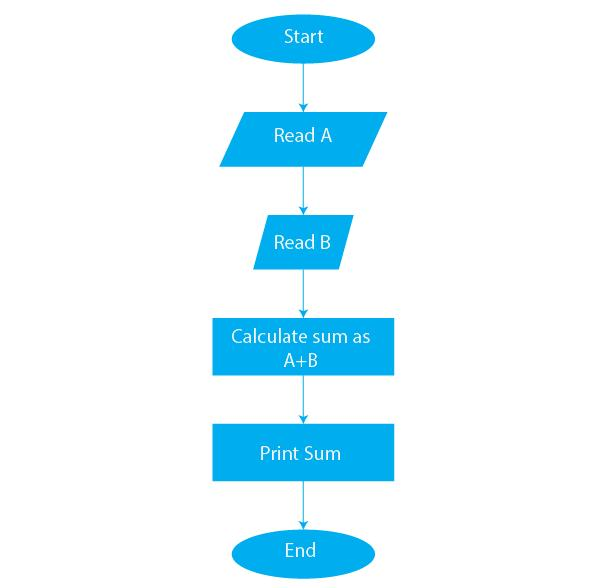
The logical sequence is:
Start → Input A, B → Calculate Sum = A + B → Display Sum → Stop
For a formal diagram, use an oval for Start and Stop, parallelograms for input and output, a rectangle for the calculation, and arrows to connect each step.


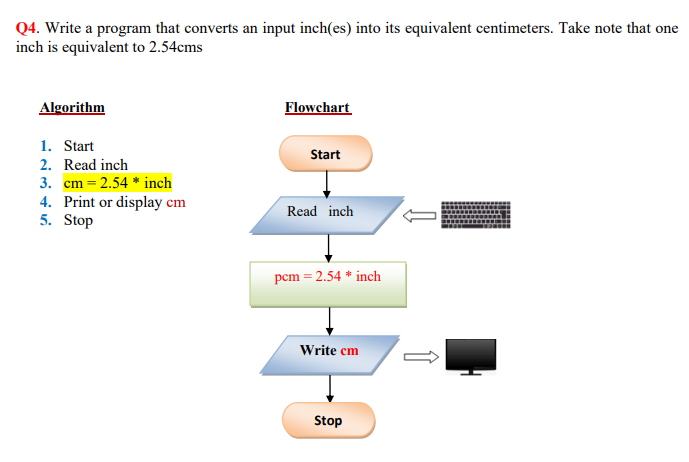
Advantages of a Flowchart
- Represents program logic visually.
- Makes the sequence of operations easier to understand.
- Helps explain a solution to other people.
- Supports program testing and debugging.
- Helps document how a program works.
Limitations of a Flowchart
- Large programs can require complicated diagrams.
- Updating a large flowchart can take time.
- Flowcharts do not replace the actual program code.
- Detailed logic can make a diagram difficult to read.
Difference Between Algorithm and Flowchart
| Algorithm | Flowchart |
|---|---|
| Represents a solution using written steps. | Represents a solution using graphical symbols. |
| Mainly uses words and numbered instructions. | Uses shapes, arrows, and symbols. |
| Usually quick to write and modify. | Drawing and modifying complex diagrams can take more time. |
| Does not require standard graphical symbols. | Uses standard symbols to represent different operations. |
| Example: Numbered steps to calculate a sum. | Example: A diagram showing input, calculation, and output. |
Important Questions and Answers
Short-Answer Questions
1. What is programming?
Programming is the process of designing and writing instructions that a computer can execute to perform tasks or solve problems.
2. Define a program.
A program is a set of instructions written in a programming language to perform a particular task.
3. Who is a programmer?
A programmer is a person who designs, writes, tests, and maintains computer programs.
4. What is a programming language?
A programming language is a formal language used to write instructions that a computer can execute directly or after translation.
5. What is software?
Software is a collection of programs, procedures, and related data that enables a computer to perform specific tasks.
6. Name the two major categories of programming languages based on their level.
They are low-level programming languages and high-level programming languages.
7. What is machine language?
Machine language is a language consisting of binary-coded instructions that are understood directly by a processor.
8. What is assembly language?
Assembly language uses symbolic instructions that an assembler translates into machine code.
9. What is an algorithm?
An algorithm is a finite sequence of clear, ordered steps used to solve a problem.
10. What is a flowchart?
A flowchart is a graphical representation of an algorithm using standard symbols and arrows.
Long-Answer Questions
- Explain program, programmer, programming language, and software with examples.
- Describe low-level and high-level programming languages and compare their features.
- Explain the scientific applications of programming with examples.
- Explain the business applications of programming with examples.
- Define an algorithm and describe the characteristics of a good algorithm.
- Define a flowchart and explain its common symbols.
- Differentiate between an algorithm and a flowchart.
- Write an algorithm to calculate the sum of two numbers.
Practice Activity
Task: Prepare an algorithm and flowchart to calculate the area of a rectangle.
Use the formula:
Area = Length × Breadth
Your algorithm should input the length and breadth, calculate the area, display the result, and stop.
Frequently Asked Questions (FAQs)
1. What are the principles of programming in Class 9?
This syllabus unit covers the introduction to programming, categories of programming languages, scientific and business applications, and program design tools such as algorithms and flowcharts.
2. What is the difference between an algorithm and a program?
An algorithm describes the ordered steps for solving a problem. A program implements a solution using a programming language.
3. Why are algorithms and flowcharts important?
They help programmers plan and understand the logic of a solution before writing code.
4. What are the applications of programming?
Programming is used in scientific research, engineering, business, banking, education, healthcare, communication, and many other fields.
5. Which programming language is easiest for beginners?
The answer depends on the learner’s goals and the course. Python is often considered beginner-friendly, while C is useful for learning procedural programming and fundamental computer concepts.
Conclusion
The principles of programming form the foundation of computer programming. Understanding programs, programmers, programming languages, software, and language categories helps students develop a basic understanding of how software is created.
Scientific and business applications demonstrate how programming solves real-world problems. Algorithms and flowcharts help students plan logical solutions before converting them into computer programs.
Students should revise the definitions, understand the differences between concepts, learn the flowchart symbols, and practise designing algorithms for simple problems.
Continue learning: Explore more Class 9 Computer Engineering notes and programming lessons at BasantYadav.com.np.
Author: Er. Basant Kumar Yadav
Computer Engineering Instructor
Website: https://basantyadav.com.np/