package com.example;
import java.util.ArrayList;
public class MyClass {
private int age;
public MyClass(int age) {
this.age = age;
}
public void display() {
System.out.println("Age: " + age);
}
}
Types of Classes in Java
In Java, classes are broadly classified into two main types:
1. Built-in Classes:
These are the classes that come pre-defined in the Java API (Application Programming Interface). They are already available in the Java libraries and can be used directly by importing the required package. Examples of built-in classes are String, Scanner, ArrayList, Math, etc. For instance, the Scanner class is used to take input from the user, and the Math class is used for mathematical operations like square root, power, and trigonometric functions.
Example:
import java.util.Scanner;

class Example {
public static void main(String[] args) {
Scanner sc = new Scanner(System.in);
System.out.print("Enter your name: ");
String name = sc.nextLine(); // Using built-in class Scanner
System.out.println("Hello " + name);
}
}
2. User-defined Classes:
These are the classes that are created by programmers according to the requirements of the program. A user-defined class acts as a blueprint for creating objects and can contain fields, methods, and constructors. This type of class is helpful when you need to represent real-world entities in code, such as Car, Student, or Employee.
Example:
Java Object:
In Java object is a fundamental unit of Object-Oriented Programming (OOP). It is an instance of a class, meaning it is created from a class blueprint. An object represents a real-world entity and has both state (properties/fields) and behavior (methods).
For example, in real life a Car is an object with properties like color, brand, speed, and behaviors like driving, braking, and honking. Similarly, in Java programming, we create objects to model such entities.
Creating Objects in Java
Objects are created using the new keyword and a constructor
ClassName objectName = new ClassName();
example:
class Car {
void drive() {
System.out.println("Car is driving...");
}

public static void main(String[] args) {
Car myCar = new Car(); // Object creation
myCar.drive(); // Calling method using object
}
}
Initialization of Object in Java
After creating an object in Java, we need to initialize it so that its fields (variables) get values before use. Java provides different ways to initialize an object.
1. Initialization using Reference Variable: We directly assign values to object fields using the dot (.) operator.
Example:
class Student {
String name;
int age;
}
class Test {
public static void main(String[] args) {
Student s1 = new Student(); // Object creation
s1.name = "Rahul"; // Initialization
s1.age = 20;
System.out.println("Name: " + s1.name + ", Age: " + s1.age);
}
}
2. Initialization using Methods: We can define a setter method inside a class to initialize object values.Example:
class Student {
String name;
int age;

void setData(String n, int a) {
name = n;
age = a;
}

void display() {
System.out.println("Name: " + name + ", Age: " + age);
}
}

class Test {
public static void main(String[] args) {
Student s1 = new Student();
s1.setData("Rahul", 20); // Initialization via method
s1.display();
}
}
Constructors in Java:
In Java, a constructor is a special method that is used to initialize objects. It is automatically called when an object of a class is created. A constructor has the same name as the class and does not have a return type (not even void).
Characteristics of Constructors
- The constructor name must be the same as the class name.
- It is invoked automatically when an object is created.
- Constructors do not have a return type.
- They are mainly used to initialize object variables.
- If no constructor is defined, Java provides a default constructor automatically.
Types of Constructors in Java:
There are 3 types of construction in Java programming, and these are default, Parameterized, and copy construction.
1. Default Constructor
A default constructor is a constructor with no parameters. It initializes objects with default values. If no constructor is defined in a class, the Java compiler automatically provides a default constructor. Example:
class Car {
Car() { // Default constructor
System.out.println("Default Constructor called");
}
public static void main(String[] args) {
Car c = new Car(); // Calls default constructor
}
}
2. Parameterized Constructor
A parameterized constructor is a constructor that accepts arguments (parameters) to initialize object fields with specific values at the time of creation. Example:
class Student {
String name;
int age;
Student(String n, int a) { // Parameterized constructor
name = n;
age = a;
}
void display() {
System.out.println("Name: " + name + ", Age: " + age);
}
public static void main(String[] args) {
Student s1 = new Student("Rahul", 20); // Passing values
s1.display();
}
}
3. Copy Constructor
A copy constructor is a constructor that creates a new object by copying the values of another object. Java does not provide it by default, but programmers can define it manually. Example:
class Student {
String name;
int age;
Student(String n, int a) {
name = n;
age = a;
}
Student(Student s) { // Copy constructor
name = s.name;
age = s.age;
}
void display() {
System.out.println("Name: " + name + ", Age: " + age);
}
public static void main(String[] args) {
Student s1 = new Student("Rahul", 20);
Student s2 = new Student(s1); // Copy constructor
s2.display();
}
}
Constructor Overloading in Java:
In Java, constructor overloading is a feature that allows a class to have more than one constructor with the same name but different parameter lists (number or type of parameters). It is a way to create objects in multiple ways and initialize them differently. Constructor overloading is similar to method overloading, but it applies specifically to constructors.
Features of Construction Overloading:
- All constructors in a class have the same name as the class.
- Constructors must differ in their parameter list (number, type, or both).
- Overloaded constructors help create objects with different initial states.
- The correct constructor is called automatically based on the arguments passed during object creation.
Example of Constructor Overloading
class Student {
String name;
int age;
// Default constructor
Student() {
name = "Unknown";
age = 0;
}
// Parameterized constructor (1 parameter)
Student(String n) {
name = n;
age = 0;
}
// Parameterized constructor (2 parameters)
Student(String n, int a) {
name = n;
age = a;
}
void display() {
System.out.println("Name: " + name + ", Age: " + age);
}
public static void main(String[] args) {
Student s1 = new Student(); // Calls default constructor
Student s2 = new Student("Rahul"); // Calls constructor with 1 parameter
Student s3 = new Student("Rita", 22); // Calls constructor with 2 parameters
s1.display();
s2.display();
s3.display();
}
}
Inheritance in Java:
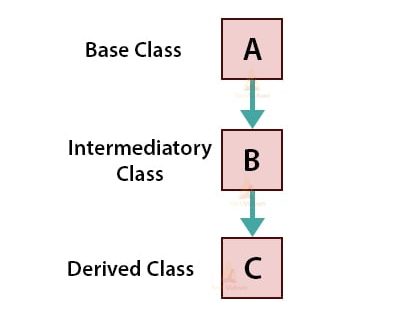
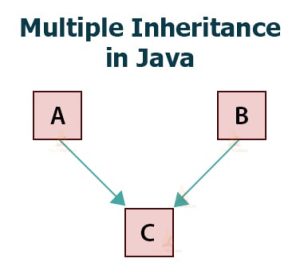
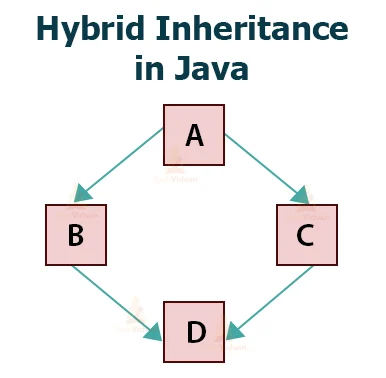
Inheritance is one of the core concepts of Object-Oriented Programming (OOP) in Java. In Java, inheritance is a mechanism where one class acquires the properties and behaviors (fields and methods) of another class. It is an important concept of Object-Oriented Programming (OOP) that promotes code reusability and method overriding.
Java supports the following types of inheritance:
1. Single Inheritance: Single inheritance is a type of inheritance where one derived class (child class) inherits from only one base class (parent class). It allows the child class to use the variables and methods of its parent class.
Declaration of Single Inheritance in Java