Table of Contents
ToggleIntroructions to cprogramming
C is a powerful, general-purpose programming language developed in the early 1970s by Dennis Ritchie at Bell Labs. It’s widely used for system programming, developing operating systems, embedded systems, and high-performance applications due to its efficiency, flexibility, and low-level control over hardware. Here’s an introduction to C programming, covering its basics, structure, and key concepts:
Why Learn C?
- Foundation for Other Languages: C is the basis for many modern languages like C++, Java, and Python.
- Performance: C provides fine-grained control over memory and hardware, making it fast and efficient.
- Portability: C programs can run on various platforms with minimal changes.
- Versatility: Used in operating systems (e.g., Linux), games, databases, and embedded systems.
Basic Structure of a C Program
A C program consists of functions, with the main() function serving as the entry point. Here’s a simple example:
#include<stdio.h> // Include standard input/output library
int main() { // Main function
printf("Hello, World!\n"); // Print to console
return 0; // Indicate successful execution
}- #include <stdio.h>: Imports the standard input/output library for functions like printf.
- int main(): The program’s starting point. int indicates it returns an integer.
- printf: Outputs text to the console.
- return 0: Signals the program ended successfully.
Importance of C Programming
- Foundation of Programming:
- C is one of the oldest and most widely used programming languages.
- It teaches the basic concepts of programming like variables, loops, conditions, and functions.
- Easy to Learn and Understand:
- The syntax of C is simple and close to English.
- Beginners can easily understand how a program works.
- Fast and Efficient:
- C programs run very fast because the language is close to machine-level code.
- It is good for making software that needs speed, like games or system tools.
- Used in Operating Systems:
- Most parts of operating systems like Windows, Linux, and Mac are made using C.
- It helps in understanding how operating systems work.
- Portable Language:
- A C program written on one computer can run on another with little or no change.
- This makes C useful for developing software on different devices.
- Helps in Learning Other Languages:
- Many modern languages like C++, Java, and Python are based on C.
- Learning C makes it easier to learn those languages later.
- Control Over System:
- C allows direct control of memory and hardware using pointers.
- This is useful for writing programs that interact with hardware or need high performance.
- Used in Embedded Systems:
- Devices like washing machines, microwave ovens, and smartwatches use C in their software.
- It is perfect for small, low-memory systems.
Preprocessor Directive in C
What is a Preprocessor Directive?
- A preprocessor directive is a command that is processed before the actual compilation of the code begins.
- These commands start with # (hash symbol).
- They are used to give instructions to the compiler, like including files or defining constants.
Common Preprocessor Directives
- #include
- It is used to include header files in the program.
- Example:
#include <stdio.h> // includes standard input-output functions
2.#define
- It is used to define constants or macros.
- Example:
#define PI 3.14 // defines PI as 3.14
3.#undef
- It is used to undefine a previously defined macro.
- Example:
#undef PI
4.#ifdef, #ifndef, #endif
- These are used for conditional compilation.
- Example:
#ifdef DEBUG
printf("Debug mode is on");
#endif5.#if, #else, #elif
- These are also used for conditional checks in the code.
- Example:
#if PI > 3
printf("PI is greater than 3");
#endifWhy is it Important?
- Helps reuse code by including header files.
- Makes code easier to manage using constants.
- Allows part of the code to be compiled conditionally, useful for testing and debugging
Header Files in C
What is a Header File?
- A header file is a file that contains prewritten code, such as function declarations, macros, and definitions.
- It helps to reuse code and keep the program organized.
- Header files usually have the extension .h (e.g., h).
How to Use a Header File?
- You can include a header file in your program using the #include
- Example:
· #include <stdio.h> // includes the Standard Input Output header file
Types of Header Files
Standard Header Files
- These are provided by the C language.
- Examples:
- h – for input/output functions like printf(), scanf()
- h – for mathematical functions like sqrt(), pow()
- h – for string functions like strlen(), strcpy()
- h – for general functions like malloc(), exit()
User-Defined Header Files
- You can create your own header files.
- These usually contain functions you write yourself.
- Example:
#include "myfile.h"
Why Are Header Files Important?
- Saves time – no need to write common functions again and again.
- Improves readability – makes your code clean and well-organized.
- Supports modular programming – helps break code into smaller, manageable parts.
- Encourages reusability – the same header file can be used in many programs.
Tokens
In C programming, tokens are the smallest individual elements or building blocks of a program that the compiler can understand. They are the basic components used to construct meaningful statements and expressions in C.
Types of Tokens in C:
1. keywords:
Keywords (also called reserved words) are predefined identifiers that have special meanings in the C language. They are part of the syntax and cannot be used as variable names, function names, or any other identifiers.
Examples: int, float, if, else, while, return, for if, else, switch, case, default, for, while, do, break, continue, goto return, void auto, register, static, extern struct, union, enum const, volatile sizeof, typedef
2. Identifier :
Identifiers are user-defined names given to variables, functions, arrays, structures, etc., in a C program. They are used to uniquely identify different program elements.
Rules for Naming Identifiers
- Must begin with a letter (A-Z, a-z) or underscore_
- Valid: sum, _count, totalAmount
- Invalid: 1var, @value
- Can contain letters, digits (0-9), and underscores (_)
- Valid: age1, student_name, MAX_SIZE
- Invalid: user-name, price$
- Cannot be a C keyword
- Invalid: int, if, return
- Case-sensitive
- Age, age, and AGE are different identifiers.
- No special characters (except _)
- Invalid: user@email, num#1
- No length limit (but compilers may impose one)
3. Constant
- In C programming, a constant is a value that cannot be changed during the execution of a program.
- Constants are fixed values that do not change during program execution. They are also called literals. C supports several types of constants, each with specific syntax and usage rules.
Types of Constants in C
- Integer Constants
- Whole numbers without fractional parts is called integer constants.
- It can be decimal, octal (prefix 0), or hexadecimal (prefix 0x).
- Example:
int decimal = 42; // Decimal int octal = 052; // Octal (42 in decimal) int hex = 0x2A; // Hexadecimal (42 in decimal)
2. Floating-Point (Real) Constants
- Numbers with a decimal point or exponent notation are called floating-point constants.
- The default type is double(use f suffix for float).
- Example
float pi = 3.14f; // Float constant double bigNum = 1.5e6; // Exponential (1.5 × 10⁶)
3. Character Constants
- A single character enclosed in single quotes (‘ ‘) is called a character constant.
- Can be letters, digits, escape sequences, or ASCII values.
- Example
char grade = 'A'; char newline = '\n'; char beep = '\a'; // Alert (bell) sound
4. String Constants
- The sequence of characters enclosed in double quotes (” “) is called a string constant.
- Automatically ends with a null terminator (‘\0’).
- Example
char name[] = "Alice"; // Stored as 'A','l','i','c','e','\0'
printf("Hello, %s!", name);Semicolons
In C programming, a semicolon (;) is a punctuation mark used as a statement terminator. It tells the compiler where a statement ends, allowing the program to be parsed correctly. Semicolons are a crucial part of C syntax, and their proper use is essential for writing valid code.
Where is the Semicolon Used?
- At the end of variable declarations
Example: float pi = 3.14; - After function calls
Example: printf(“Hello”); - After assignments and expressions
Example: x = y + 5;
Comments in c programming
In the C language, comments are used to explain the code, make it more understandable for humans, and help with debugging or maintenance. The compiler ignores comments; they do not affect how the program runs.
Types of Comments in C:
1. Single-line Comments
- Single-line comments start with //
- Used for short notes or explanations on a single line
- Example:
printf("Hello, world!"); // This is a single-line comment2 Multi-line comments
- Multi-line comments start with /* and end with */
- Used for longer explanations or block comments
- Example:
int y = 20; /* This is a multi-line comment. It can extend over several lines. */
Whitespace in C Language
Whitespace refers to any character or series of characters that represent horizontal or vertical space in the code but are ignored by the compiler (except when they separate tokens like keywords, variables, and operators).
Common Whitespace Characters in C
- Space ( ): Separates tokens (e.g., keywords, identifiers, operators).
- Tab (\t): Indents code for alignment.
- Newline (\n): Marks the end of a line, often used to separate statements or improve readability.
- Carriage Return (\r): Less common, sometimes used in specific systems.
- Vertical Tab (\v) and Form Feed (\f): Rarely used, but considered whitespace.
Example: Using All Whitespace Characters in C
#include <stdio.h>
int main() {
int a = 10; // spaces and tab used here
int b=20;
printf("The value of a is: %d\n", a); // newline \n used here
printf("The value of b is: %d\n", b);
return 0;
}Escape Sequence
In the C programming language, an escape sequence is a combination of characters that begins with a backslash (\) followed by one or more characters.
It is used to represent special characters or control characters that cannot be easily typed or displayed directly in a string literal or character constant. Escape sequences are interpreted by the compiler to produce the corresponding character or behavior, primarily in output functions like print().
Common Escape Sequences in C
| Escape Sequence | Description |
|---|---|
| \n | Newline (line feed) |
| \t | Horizontal tab |
| \r | Carriage return |
| \b | Backspace |
| \f | Form feed |
| \a | Alert (bell or beep) |
| \\ | Backslash (\) |
| \' | Single quote (') |
| \" | Double quote (") |
| \0 | Null character (end of string) |
| \xhh | Hexadecimal value (e.g., \x41 for 'A') |
| \ooo | Octal value (e.g., \101 for 'A') |
Example:
#include <stdio.h>
int main() {
printf("Hello\nWorld\t!"); // \n creates a new line, \t adds a tab
printf("\nShe said, \"Hello!\""); // \" includes double quotes in the string
printf("\nBackslash: \\"); // // prints a single backslash
return 0;
}Output of the program: Hello World! She said, "Hello!" Backslash: \
Variables in C Programming
In C programming, a variable is a name given to a memory location where data can be stored, modified, and accessed during the execution of a program.
Rules for Naming Variables
- Must begin with a letter (A-Z, a-z)or underscore (_).
- Can contain letters, digits (0-9), and underscores.
- Cannot use C keywords (e.g., int, float, return).
- Case-sensitive(Age and age are different).
- Should be meaningful(e.g., studentAge instead of x).
Example of a declaration of a variable
#include <stdio.h>
int globalVar = 10; // Global variable
int main() {
int localVar = 20; // Local variable
printf("Global: %d, Local: %d", globalVar, localVar);
return 0;
}Character set:
In C programming, a character set defines the collection of valid characters that can be used to write source code, form identifiers (like variable names), and represent data (like strings and characters). The C language supports two main character sets:
- Source Character Set → Used when writing C code.
- Execution Character Set → Used when the program runs (may differ based on the system).
Types of Characters in C
A. Letters (Alphabets)
- Uppercase letters:
AtoZ - Lowercase letters:
atoz
B. Digits (Numbers)
0to9
C. Special Characters
| Character | Description | Example Usage | ||
|---|---|---|---|---|
, | Comma | int a, b; | ||
. | Dot | float pi = 3.14; | ||
; | Semicolon | int x = 5; | ||
: | Colon | case 'A': | ||
? | Question mark | (a > b) ? a : b; | ||
' | Single quote | char c = 'A'; | ||
" | Double quote | char str[] = "Hello"; | ||
! | Exclamation mark | if (!flag) | ||
@ | At symbol | (Rarely used in C) | ||
# | Hash | #include <stdio.h> | ||
$ | Dollar sign | (Allowed but rarely used) | ||
% | Percent | printf("%d", x); | ||
^ | Caret | int a = b ^ c; (Bitwise XOR) | ||
& | Ampersand | int *ptr = &x; | ||
* | Asterisk | int *ptr; | ||
( ) | Parentheses | if (x > 0) | ||
[ ] | Square brackets | int arr[5]; | ||
{ } | Curly braces | int main() { ... } | ||
_ | Underscore | int my_var; | ||
+ | Plus | int sum = a + b; | ||
- | Minus | int diff = a - b; | ||
= | Equal | int x = 10; | ||
< > | Less/Greater than | if (a < b) | ||
~ | Tilde | int a = ~b; (Bitwise NOT) | ||
/ | Slash | float div = a / b; | ||
\ | Backslash | Used in escape sequences (\n, \t) |
Whitespace Characters
- Space (
) - Tab (
\t) - Newline (
\n) - Carriage return (
\r) - Form feed (
\f)
Constants in C Programming Language
In C programming, a constant is a value that does not change during the execution of the program. Once a constant is defined, its value remains fixed throughout the program.
Types of Constants in C:
Integer constant : In C programming, an integer constant is a type of literal constant that represents a whole number (integer) value. It is a fixed value written directly in the source code and cannot be modified during program execution. Integer constants are used to represent numerical values without decimal points, such as counts, indices, or fixed quantities. Example 5, -10, and 0
- Floating point constant:
In C programming, a floating-point constant is a type of literal constant that represents a number with a fractional part, used to store real numbers (numbers with decimal points).Example 3.1415
- Character constant: In C programming, a character constant is a type of literal constant that represents a single character enclosed in single quotes (‘). It is used to store a single character value, such as a letter, digit, or special symbol, and is typically associated with the char data type. Example: ‘A’, ‘5’, ‘@’, ‘\n’.
String Constants: A sequence of characters enclosed in double quotes. Examples:
"Hello","C Programming"Symbolic Constant : symbolic constant can be defined using the
#definepreprocessor directive. Example: #define PI 3.14 , #define MAX 100
Example program:
#include <stdio.h>
#define PI 3.14 // symbolic constant
int main() {
const int roll = 25; // constant variable
float area;
int radius = 5;
area = PI * radius * radius;
printf("Roll Number: %d\n", roll);
printf("Area of Circle: %.2f\n", area);
return 0;
}Variable:
In C programming, a variable is a named storage location in the computer’s memory that holds a value that can be used and changed during the execution of a program.
Rules for Naming Variables (Identifiers)
- Must begin with a letter (A-Z, a-z) or an underscore (
_). - Can contain letters, digits (0-9), and underscores.
- Cannot start with a digit (e.g.,
1varis invalid). - Cannot use C keywords (e.g.,
int,if,return). - Case-sensitive (
age≠Age≠AGE). - No special characters (e.g.,
@,#,$,%) are allowed. - Should not exceed 31 characters (some compilers may ignore extra characters).
Data types:
In C programming, data types define the type of data a variable can hold, while format specifiers are used in functions like printf() and scanf() to read or display data correctly. Below is a detailed breakdown:
Basic Data Types in C
C supports the following primary data types:
| Data Type | Size (bytes) | Range | Description |
|---|---|---|---|
int | 2 or 4 | -32,768 to 32,767 (2-byte)-2,147,483,648 to 2,147,483,647 (4-byte) | Stores whole numbers |
float | 4 | 1.2E-38 to 3.4E+38 (6-7 decimal digits) | Single-precision floating-point |
double | 8 | 2.3E-308 to 1.7E+308 (15-16 decimal digits) | Double-precision floating-point |
char | 1 | -128 to 127 (or 0 to 255) | Stores a single charact |
Format Specifiers for Input/Output
Format specifiers are used with printf() and scanf() to define how data is displayed or read.
| Data Type | Format Specifier | Example (printf) | Example (scanf) |
|---|---|---|---|
int | %d | printf("Age: %d", age); | scanf("%d", &age); |
float | %f | printf("Height: %.2f", height); | scanf("%f", &height); |
double | %lf | printf("Salary: %lf", salary); | scanf("%lf", &salary); |
char | %c | printf("Grade: %c", grade); | scanf(" %c", &grade); |
string (char array) | %s | printf("Name: %s", name); | scanf("%s", name); |
EXAMPLE
#include <stdio.h>
int main() {
int age;
float height;
char grade;
printf("Enter age, height, and grade: ");
scanf("%d %f %c", &age, &height, &grade);
printf("Age: %d\nHeight: %.2f\nGrade: %c\n", age, height, grade);
return 0;
}
OUTPUT
Enter age, height, and grade: 25 5.9 A
Age: 25
Height: 5.90
Grade: AExample of input output Statement
#include <stdio.h>
int main() {
int age;
float height;
printf("Enter your age: "); //output statements
scanf("%d", &age); //input statements
printf("Enter your height: ");
scanf("%f", &height);
printf("You are %d years old and %.2f feet tall.", age, height);
return 0;
}
output:
Enter your age: 20
Enter your height: 5.8Write a C program that displays “C Programming is easy.”
#include <stdio.h>
int main() {
printf("C Programming is easy.\n");
return 0;
}Write a program to multiply two numbers and display the product. The program should ask the user for two numbers.
#include <stdio.h>
int main() {
int num1, num2, product;
printf("Enter first number: "); // Ask the user for input
scanf("%d", &num1);
printf("Enter second number: ");
scanf("%d", &num2);
product = num1 * num2; // Calculate the product
printf("Product of %d and %d is: %d\n", num1, num2, product); // Display the result
return 0;
}Write a program to calculate the area and circumference of a circle having radius r. The radius should be taken from the user.
#include <stdio.h>
#define PI 3.14159
int main() {
float radius, area, circumference;
printf("Enter the radius of the circle: ");
scanf("%f", &radius);
area = PI * radius * radius; // Calculate area: π * r^2
circumference = 2 * PI * radius; // Calculate circumference: 2 * π * r
printf("Area of the circle: %.2f square units\n", area);
printf("Circumference of the circle: %.2f units\n", circumference);
return 0;
}Write a program to calculate the area and perimeter rectangle. The input should be taken from the user.
#include <stdio.h>
int main() {
float length, width, area, perimeter;
printf("Enter the length of the rectangle: ");
scanf("%f", &length);
printf("Enter the width of the rectangle: ");
scanf("%f", &width);
area = length * width;
perimeter = 2 * (length + width);
printf("Area of the rectangle: %.2f square units\n", area);
printf("Perimeter of the rectangle: %.2f units\n", perimeter);
return 0;
}Write a C program that converts temperature in Celsius to Fahrenheit.
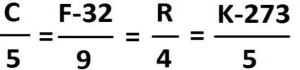
#include <stdio.h>
int main() {
float celsius, fahrenheit;
printf("Enter temperature in Celsius: ");
scanf("%f", &celsius);
fahrenheit = (celsius * 9.0f/5) + 32;
printf("%.1f°C = %.1f°F\n", celsius, fahrenheit);
return 0;
}Write a C program that calculates the simple interest. The user should take input
#include
int main() {
float principal, rate, time, interest;
printf("Enter principal amount: ");
scanf("%f", &principal);
printf("Enter rate of interest (%% per year): ");
scanf("%f", &rate);
printf("Enter time period (in years): ");
scanf("%f", &time);
interest = (principal * rate * time) / 100;
printf("\nSimple Interest Calculation:\n");
printf("Principal: ₹%.2f\n", principal);
printf("Rate: %.2f%%\n", rate);
printf("Time: %.2f years\n", time);
printf("Simple Interest: ₹%.2f\n", interest);
return 0;
}Write a C program to calculate the simple interest. The user should take the input.
#include <stdio.h>
int main() {
float principal, rate, time, simpleInterest;
printf("Enter the principal amount: "); // Taking input from the user
scanf("%f", &principal);
printf("Enter the rate of interest (in %%): ");
scanf("%f", &rate);
printf("Enter the time (in years): ");
scanf("%f", &time);
simpleInterest = (principal * rate * time) / 100; // Calculating simple interest
printf("Simple Interest = %.2f\n", simpleInterest); //Displaying the result
return 0;
}
Compiled by: Er. Basant Kumar Yadav
