An operating system (OS) is special software that helps a computer’s hardware and other software work together. It controls the computer and any devices connected to it, making things easier for programs and users.
An operating system is a group of programs that control the computer and any devices connected to it. It hides the complex details of the hardware from the programmer and provides a simple way to work with files. The operating system makes it easier for programmers to use the computer by offering a user-friendly interface, even though it may be slower than using the hardware directly.
The two main jobs of an operating system are:
Virtual machine management.
Virtual machine management.
Virtual machine management.
A computer is made up of various resources like processors, memory, timers, disks, printers, and other devices.
The operating system manages these resources and assigns them to different programs.
As a resource manager, it controls how processors, memory, and input/output devices are shared and used by different programs.
When many user programs run at the same time, the processor is also treated as a resource. The operating system decides how much processor time each program should get to run properly.
An operating system is a control program that manages the running of user programs to prevent errors and make better use of the computer. It mainly controls and manages input/output (I/O) devices. When multiple users use the computer, the operating system protects and manages memory and I/O devices. It also keeps track of who is using which resource and decides who should be given access to it.
2. Virtual machine management.
The architecture (instruction set, memory, I/O, and bus structure) of most computers at the machine level language is primitive and awkward to program, especially for input/output operations.
Users do not want to deal with programming storage devices. The operating system makes this easier by providing a simple, high-level view, where storage devices appear as a collection of named files.
Such files consist of the useful piece of information like a digital photo, email messages, or web page.
An Operating System provides a set of basic commands or instructions to perform various operations such as read, write, modify, save or close.
Also, dealing with them is easier than directly dealing with hardware. Thus, an Operating System hides the complexity of hardware and presents a beautiful interface to the users.
Fig: Operating Systems turn ugly hardware into beautiful abstractions.
Just like the operating system protects the programmer from the complex details of disk hardware by offering a simple file-based interface, it also hides many difficult tasks related to interrupts, timers, memory management, and other low-level functions.
In every case, the operating system provides a simpler and easier-to-use interface than the computer’s hardware itself.
Types of Operating Systems
Batch Operating System
In a batch OS, jobs with similar needs are grouped and processed together without user interaction. Users submit their tasks, and the system runs them one by one. It is simple but not very interactive. It is mostly used in early computers. It saves time by automating job processing.
Time-Sharing Operating System
Time-sharing OS lets many users use the computer at the same time. It quickly switches between tasks so users feel like the system is working just for them. This allows multitasking and sharing of resources. It is used in systems like servers and mainframes. It improves efficiency and user experience.
Distributed Operating System
A distributed OS manages a group of connected computers to work as one system. It shares resources and processing power among multiple machines. This system increases speed and reliability. It is used in networks and cloud computing. Users don’t see the difference between local and remote resources.
Network Operating System
Network OS controls and manages computers connected in a network. It allows file sharing, printer access, and communication between users. It provides security and user management. Common examples include Windows Server and Linux server systems. It helps organize and control network resources.
There are mainly two types of network operating systems.
Peer-to-peernetwork operating systems let users share files and resources from their own computers and use shared resources from other computers. In this type of network, all computers are equal and have the same rights. It is mainly used in small to medium local networks. An example of this system is Windows for Workgroups.
Client/server networkoperating systems allow important functions and programs to be stored on one or more main computers called file servers. These servers manage resources and keep the system secure. Other computers, called clients, connect to the servers to use these resources. Many users can share the same resources at the same time, no matter where they are. Examples include Novell NetWare and Windows 2000 Server.
5. Real-Time Operating System (RTOS)
RTOS is designed to handle tasks that need an immediate response. It is used in devices like robots, airplanes, and medical machines. The system guarantees a response within a strict time limit. It is highly reliable and predictable. RTOS focuses on fast and precise task execution
6. Mobile Operating System
Mobile OS is built for smartphones, tablets, and other portable devices. It manages apps, touch screens, cameras, and other hardware. Examples are Android and iOS. It is designed to be user-friendly and power-efficient. It supports wireless communication and multitasking.
Components of an operating system
An operating system creates a space where programs can run. To build this space, the system is divided into smaller parts with clear roles. Designing a new operating system is a big job, so it’s important to set clear goals before starting. These goals help decide which methods and steps to use.
An operating system is large and complex, so it must be divided into smaller parts. Each part should have a clear purpose, with specific inputs and outputs. Not all systems are built the same way, but many modern operating systems have similar main components outlined below.
Process management
I/O management
Main Memory Management
File & Storage Management
Protection
Networking
Protection
Command Interpreter.
Process Management:
Process management is a part of the operating system that handles all the running programs, also known as processes. It helps to start, stop, and manage these programs, making sure each one gets enough time to use the CPU. The operating system also keeps track of the state of each process, such as whether it is running, waiting, or has finished. By organizing how tasks are done, process management ensures that the system runs smoothly and efficiently.
The operating system is responsible for the following activities in connection with processes managed.
The creation and deletion of both user and system processes.
The suspension is the resumption of processes.
The provision of mechanisms for process synchronization.
The provision of mechanisms for deadlock handling.
I/O Management:
I/O Management is a part of the operating system that controls input and output devices like a keyboard, mouse, printer, and hard drive. It helps the system communicate with these devices and manage data flow between them and the computer. The operating system uses drivers and software to control each device properly. It also decides which device gets access and when, to avoid conflicts. I/O Management checks for errors and ensures smooth data transfer. This helps users and programs interact easily with hardware devices.
Main Memory Management
Main Memory Management is a part of the operating system that handles the computer’s memory (RAM). It keeps track of which parts of memory are in use and which are free. When a program runs, it gives the memory it needs and takes it back when the program finishes. It also protects one program’s memory from being used by another. Memory management helps the system work faster by organizing memory use. This allows many programs to run at the same time without problems.
File and Storage Management:
File and Storage Management is a part of the operating system that controls how data is saved, organized, and accessed on storage devices like hard drives or SSDs. It helps create, open, read, write, and delete files and folders. The system keeps track of where each file is stored and who can access it. It also protects files from being changed or deleted by unauthorized users. File management ensures that data is stored in an organized way. This makes it easy for users and programs to find and use the information they need.
Protection:
Protection is a part of the operating system that keeps programs and data safe from unauthorized access. It controls what each user or program is allowed to do. For example, it stops one program from using another program’s memory or files without permission. It also helps prevent harmful actions like deleting system files. Protection makes sure the system is secure and runs without problems.
Networking:
Networking allows the operating system to connect and communicate with other computers through a network. It helps share data, files, and resources like printers over the internet or a local network. The operating system manages network connections, sends and receives data, and ensures secure communication. Networking makes it possible to browse the web, send emails, and use online services. It plays a key role in modern computing.
Command Interpreter:
The command interpreter is the part of the operating system that takes user commands and tells the system what to do. It can be a text-based interface like the Command Prompt or a graphical interface like the Start Menu. When a user types or clicks a command, the interpreter reads it and runs the right program. It acts like a bridge between the user and the operating system. This makes it easier to control the computer.
Operating System Services
An operating system provides many services to help programs and users work smoothly. These include managing processes, memory, files, devices, protection, and networking.
1.System Calls
A system call is how a program asks the operating system’s core (called the kernel) for help. This can include things like accessing hardware (such as the hard disk), starting or stopping programs, or talking to the system’s core services like scheduling tasks. System calls are the main way a program communicates with the operating system.
When a program needs to do something that requires special permission—like reading a file or using a device—it makes a system call. This causes the processor to switch to a special mode where the operating system can safely perform the requested action. Usually, programs use a special library that acts as a link between them and the operating system to make these calls easier.
System calls provide an essential connection between running programs and the operating system, allowing programs to safely request services they cannot perform on their own.
Services provided by System Calls include:
Creating and managing processes
Managing the main memory
Accessing files, directories, and the file system
Handling input/output devices
Providing protection and security
Managing networking and communication
2.Shell and Kernel
The operating system has two main parts: the shell and the kernel. Both work together to perform tasks on the computer.
When a user types a command, it first goes to the shell. The shell acts like an interpreter—it translates the user’s command from human language into machine language that the computer can understand. After this, the shell sends the request to the kernel.
The kernel is known as the heart of the operating system. It handles all the important tasks and processes the requests sent by the shell. Once the kernel completes the task, it shows the results on the screen.
Some key jobs of the kernel include:
Controlling the state of processes by checking if they are running or waiting for input.
Managing memory by allocating it to running processes and freeing it when no longer needed.
Scheduling the CPU time for different processes and managing waiting or suspended jobs in memory.
Using virtual memory when there isn’t enough physical memory to store all programs.
Managing files on the computer and protecting them by controlling access with permissions and passwords.
Even though the kernel does many important jobs, its work is hidden from the user and happens in the background.
Structure of an Operating System
An operating system is a system that helps user programs work with the computer’s hardware. Because an operating system is complex, it should be made carefully. This makes it easier to use and change later. A good way to build it is by dividing it into smaller parts. Each part should have clear inputs, outputs, and tasks.
Below are some common ways to build the structure of an operating system.
Simple Structure
Monolith Structure
Micro-Kernel Structure
Exo-Kernel Structure
Layered Structure
Modular Structure
Virtual Machines
Simple Structure
Many operating systems started with a simple structure. They were small at first but grew bigger over time. One common example is MS-DOS. It was made for a small group of users and had a simple design. At that time, no one thought it would become so popular.
Simple structure
It is better for operating systems to have a modular structure, not like MS-DOS. This gives more control over the computer and its programs. With a modular structure, programmers can hide certain information and create internal functions as needed, without changing how the system looks from the outside
Advantages of a Simple Structure Operating System
A simple structure has fewer parts, so it is easier to design. Developers can write and test the code quickly. This helps in the faster development of the system.
The system uses less memory and storage space. It doesn’t need many resources to run. This makes it good for basic or old computers.
Due to fewer layers or modules, there is less overhead during process execution, resulting in faster response times and better performance.
Disadvantages of a Simple Structure Operating System.
All components are tightly connected, which makes it hard to separate different functions. You cannot modify or replace one part without affecting the entire system.
Adding new features or updating existing ones is complicated because the system lacks clear boundaries between components.
Due to the simple structure, there are fewer protections between different system parts, which increases the risk of errors or security issues
Monolith Structure
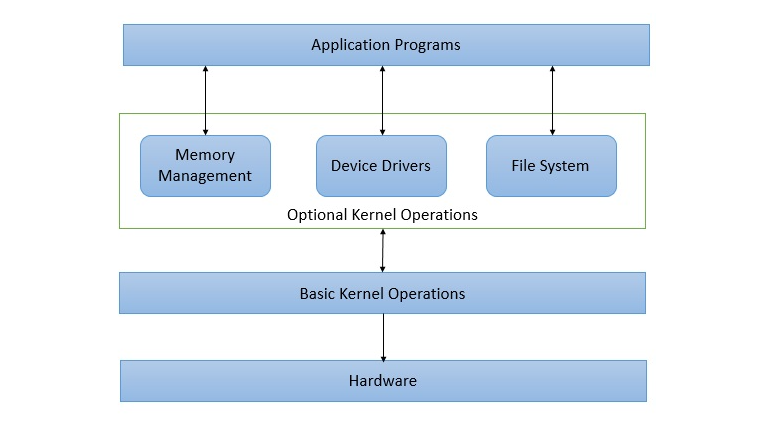
In a monolithic structured operating system, there is one main part called the kernel. It handles all the important tasks of the operating system. These tasks include managing files, memory, devices, and more.
The kernel is the core part of the operating system. It provides all the necessary services to both application programs and system programs. The kernel can access all the system’s resources and works as a link between application programs and the computer hardware.
A monolithic kernel supports features like timesharing and multiprogramming, which allow multiple programs to run at the same time. This type of structure was commonly used in old banking systems.
Monolith Structure
Advantages ofMonolith Structure
It provides high performance because all functions run in the same space.
Communication between system components is fast and efficient.
The design is simple and easy to understand in the beginning.
The kernel manages system resources directly, which improves efficiency.
Disadvantages ofMonolith Structure
It has poor modularity, making updates or changes difficult.
Maintenance is hard because all parts are tightly connected.
A small error in one part can affect the entire system, reducing security.
It is not suitable for modern, complex systems due to its limited structure.
Micro-Kernel Structure
In a monolithic structure, there is only one kernel that manages all the tasks. However, in a microkernel system, there are many small kernels, and each one is responsible for a specific function. These microkernels are developed separately, which makes the system more stable. If one kernel fails, the other kernels continue to work, and the operating system can still run smoothly.
Micro-Kernel Structure
Advantages of Micro-Kernel Structure:
It is more stable because different parts run separately.
If one part fails, the rest of the system keeps working.
It is easy to add new features without affecting the whole system.
The system is more secure since each part is isolated.
Disadvantages of Micro-Kernel Structure:
It can be slower because parts need to communicate with each other more often.
Designing and building a microkernel system is more complex.
Sometimes, communication between small kernels causes extra overhead.
It may use more system resources compared to a monolithic system.
Exo-Kernel Structure
The Exo-Kernel operating system was created at MIT. Its goal was to make the kernel very small. Instead of the kernel managing hardware, the application programs control the hardware directly. This way, programmers can write faster and better code. The exo-kernel only takes care of other important tasks, while the applications manage the hardware themselves.
Advantage of Exo-Kernel Structure
High Performance: Since application programs can manage memory themselves, well-written programs can use resources better and run faster.
Application Control: Because the operating system does not fully control resources, application programs have more power over system resources and can create custom ways to use them.
Disadvantages of Exo-Kernel Structure :
Application programmers need to manage hardware, which can be difficult.
Less protection between applications and hardware, so errors can cause problems.
More complex for programmers compared to traditional systems.
Not easy to develop for beginners or general users.
Layered Structure :
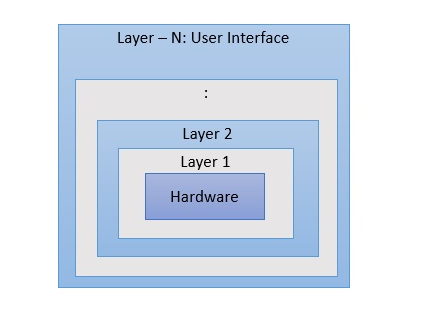
One way to make an operating system modular is called the layered approach. In this method, the hardware is at the bottom layer, and the user interface is at the top layer.An image demonstrating the layered approach is as follows
layered structure
Advantage ofLayered Structure
It is easy to design and understand because the system is divided into layers.
Each layer only interacts with the layer directly below or above it, which makes the system organized.
It is easy to debug and maintain since problems can be found in specific layers.
Layers can be updated or changed without affecting the whole system.
DisadvantagesofLayered Structure:
The system can be slower because data must pass through many layers.
Designing the right number of layers and their functions can be complicated.
If one layer has a problem, it may affect the layers above it.
Sometimes, communication between layers adds extra overhead.
Virtual Machine Structure
In this structure, hardware like the CPU, memory, and hard disks are turned into virtual machines. Users can use these virtual machines without actually setting up the real hardware each time. Virtual machines need a good amount of disk space and must be prepared before use. Many virtual machines can be created on one physical computer.
Advantage of virtual Machine Structure
Multiple virtual machines can run on one physical computer, saving space and cost.
Each virtual machine is separate, so if one crashes, others keep working.
You can run different operating systems on the same physical machine.
Virtual machines are useful for testing new software without affecting the main system.
Disadvantage of virtual Machine Structure
Virtual machines can be slower than real machines because they use extra resources.
Running many virtual machines needs a lot of memory, CPU, and disk space.
Managing virtual machines can be more difficult than using a single system.
Some power is used just to run the virtual environment, which reduces efficiency.