
Table of Contents
ToggleIntroduction to Database Management System
A Database System or Database management Systems is a way of storing and organizing data using a computer so that information can be easily saved, found, and updated. It helps people manage large amounts of data in an orderly manner. A database system includes the database, where data is stored, and the DBMS (Database Management System), which is software used to control and manage the data. Database systems are commonly used in banks, schools, hospitals, and businesses to keep information safe and well-organized.
Data
Data is a collection of raw facts and figures that have not been processed yet. On its own, data does not give clear meaning until it is organized or explained. Examples of data include numbers, names without details, or dates without any explanation. Data can be numbers, words, or symbols.
Data is mainly of two types:
a) Quantitative Data:
Quantitative data is data in the form of numbers that can be measured or counted, such as height, weight, age, or marks.
b) Qualitative Data:
Qualitative data is data that is not in numbers and describes qualities or opinions, such as feelings, ideas, or perceptions.
Information :
Information is data that has been processed or organized so that it becomes meaningful and easy to understand. When data is given context, it turns into information. For example, the number “100” is just data, but “John scored 100 in Math” is information because it clearly explains what the number means. In simple words, information is useful data that helps people understand something better.
Data vs Information
| Data | Information |
|---|---|
| Raw facts and figures | Processed and meaningful data |
| Difficult to understand alone | Easy to understand |
| Not processed | Processed and organized |
| Less useful by itself | Useful for decision making |
| Example: 85, 90, 78 | Example: “Ram scored 85 marks in English” |
Database
A database is an organized collection of data stored in a computer system. It helps users easily store, access, manage, and update information whenever needed. Databases are used in many areas, such as schools, hospitals, banks, and businesses, to keep information properly arranged. For example, a hospital database stores patient details, appointment schedules, and treatment records in an organized way.
A Database Management System (DBMS)
A Database Management System (DBMS) is software used to create, store, manage, and control data in a database. It acts as a bridge between the user and the database, allowing users to easily add, view, update, and delete data.
Some popular examples of DBMS are MySQL, Oracle, PostgreSQL, and Microsoft SQL Server. A DBMS helps keep data safe, accurate, and organized, and allows many users to access the data at the same time.
Characteristics of DBMS
a) A DBMS stores and manages data in a digital storage system, usually on a server or computer.
b) It provides a clear and organized way to view and manage how data is processed.
c) A DBMS has automatic backup and recovery features to protect data from loss.
d) It follows ACID properties, which help keep data accurate and safe even if a system failure occurs.
e) It reduces the complexity of relationships between different types of data.
f) It allows easy manipulation and processing of data, such as adding, updating, deleting, and retrieving information.
g) A DBMS helps provide security for data by controlling who can access or modify the information.
h) It allows users to view the database in different ways according to their needs and requirements.
Some of the Leading DBMS
a) MySQL – An open-source database system developed by Oracle.
b) Oracle – A proprietary database software developed by Oracle Corporation.
c) MS SQL Server – A proprietary database system developed by Microsoft.
d) IBM DB2 – A proprietary database management system developed by IBM.
e) PostgreSQL – An open-source relational database system.
f) MongoDB – A NoSQL database used for storing unstructured or flexible data.
Limitations of File System
Before databases, data was stored using file systems. A file system is a method used by an operating system to store and manage files on devices like hard disks, SSDs, and USB drives. Although it is simple, it has some limitations.
a) Data Redundancy and Inconsistency:
The same data may be stored in different files, which causes duplication (data redundancy). If data is updated in one file but not in others, it creates inconsistency. For example, a customer’s contact details may be different in two files.
b) Data Isolation:
Data is stored in separate files, so it is difficult to access all related data together. For example, to get a student’s full record, different files must be opened one by one.
c) Limited Data Security:
File systems do not provide strong security features. Because of this, data can be easily accessed by unauthorized users compared to the better security provided by DBMS.
d) Concurrency Issues:
When many users try to access or change the same data at the same time, file systems may create conflicts or even damage the data.
e) Inefficient Data Retrieval:
Finding data takes more time because each file has to be searched separately, which becomes slow when there is a large amount of data.
f) No Centralized Control:
File systems do not have a central system to manage data, making it difficult to maintain data accuracy, backups, and updates properly.
Advantages of Database Systems
DBMS ensures that data is correct and accurate. It uses rules called integrity constraints to prevent errors. This keeps all records consistent across the database.
DBMS protects data from unauthorized access. It uses passwords, user authentication, and encryption. Only authorized users can view or change data.
Data is stored centrally in a DBMS, which avoids duplicate copies of the same information. This also prevents inconsistent data across the system.
4. Improved Data Access
Multiple users can access data at the same time, making collaboration easy. Data retrieval is fast and simple using queries. This supports teamwork and smooth operations.
5. Efficient Data Management
DBMS automates storing, updating, and deleting data, reducing manual work and errors. Complex operations like generating reports or calculations become simpler and faster.
6. Backup and Recovery
DBMS provides tools to save and restore data automatically. It protects information from system crashes or accidental loss. Important data can always be recovered when needed.
7. Support for Large Datasets
DBMS can manage very large amounts of data efficiently. It organizes and retrieves data without slowing down performance. Even millions of records can be handled smoothly.
Disadvantages of Database Systems
- High Cost :– Setting up and maintaining a DBMS can be expensive for hardware, software, and licenses.
- Complexity :– DBMS is more complicated than simple file systems and requires trained staff to manage it.
- Maintenance: – Databases need regular updates and monitoring to keep them running efficiently.
- Hardware and Software Requirements :– A DBMS requires good computers and reliable software, which can add extra cost.
- Security Risks :– If not managed properly, databases can be hacked or accessed by unauthorized users.
- Risk of System Failure: – Hardware or software failures can cause serious data loss and halt operations.
- Learning Curve :– Users need training to use a DBMS effectively, which may take time.
Applications of Database Systems
Database systems are essential across a wide range of industries, where they help streamline and automate various processes. Here are some common applications:
Banking Systems
Banks use database systems to store customer information, account details, transaction records, loan data, and credit card information. Databases help banks perform secure transactions, manage customer accounts, and generate financial reports efficiently.Education Systems
Schools, colleges, and universities use databases to manage student records, attendance, exam results, course details, teacher information, and library systems. This makes it easier to store and retrieve academic information quickly.Healthcare Systems
Hospitals and clinics use database systems to store patient records, medical history, appointment details, billing information, and doctor schedules. This improves patient care and helps doctors access accurate information when needed.E-Commerce Websites
Online shopping platforms use databases to store product details, customer information, orders, payment records, and delivery information. Database systems help ensure smooth transactions and fast product searches.Railway and Airline Reservation Systems
Reservation systems use databases to manage passenger details, ticket bookings, schedules, seat availability, and cancellations. This allows users to book tickets quickly and accurately.Business and Inventory Management
Companies use databases to store information about products, sales, employees, suppliers, and customers. Database systems help in managing stock, tracking sales, and improving business operations.Social Media Platforms
Social media applications use databases to store user profiles, posts, comments, messages, and friend lists. Databases help manage large amounts of data and provide quick access to user information.Government Organizations
Government offices use database systems to store information related to citizens, taxes, national ID records, voting systems, and public services. This helps in better data management and faster service delivery.
These applications show that database systems play a very important role in modern technology and everyday life.
Types of Database Users
A database user is defined as a person who interacts with data daily by updating, reading, and modifying the stored information. Database users can access and retrieve data based on their roles and responsibilities. The main types of database users are described below:
Database Administrator (DBA)
The Database Administrator is responsible for managing the entire database system. The DBA controls access permissions, maintains data security, performs backups, and ensures that the database runs efficiently without errors.Application Programmers (Developers)
Application programmers write programs that interact with the database. They use programming languages such as Java, C++, or Python along with SQL to create applications that store, update, and retrieve data from the database.End Users
End users are the people who use the database through applications without directly writing database queries. For example, students using a school portal, customers using an online shopping website, or employees using a company system.Naive Users (Parametric Users)
Naive users use the database in a simple and routine way. They follow predefined instructions and do not need technical knowledge. Examples include bank clerks, ticket booking operators, and data entry operators.Sophisticated Users
Sophisticated users have a good understanding of the database system. They can write complex queries and perform advanced operations. Engineers, data analysts, and researchers are examples of sophisticated users.Specialized Users
Specialized users create special database applications for specific purposes such as scientific research, artificial intelligence systems, or complex data analysis. They require advanced knowledge of database systems.
These different types of database users help in managing, maintaining, and using data effectively in an organization.
DBMS Architecture
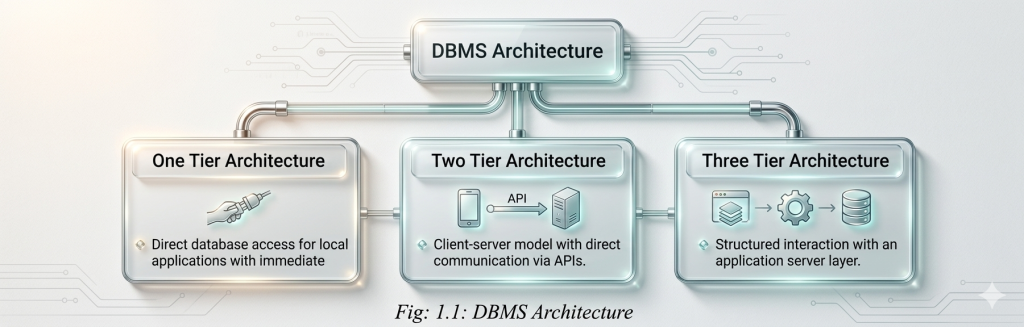
The design of a Database Management System (DBMS) depends on its architecture. DBMS architecture defines how the database system is structured and how users interact with it. The basic architecture is based on the client/server model, where clients send requests and the server processes them.
The main types of DBMS architecture are explained below:
1.One Tier Architecture
One Tier Architecture is the simplest type of DBMS architecture. In this system, the database is directly accessible to the user. The user works directly on the DBMS without any middle layer.Any changes made by the user are directly applied to the database. This architecture does not provide user-friendly tools for end users, so it is not suitable for general public use.
It is mainly used for developing local applications. Programmers use it to communicate directly with the database for quick testing, development, and fast response.
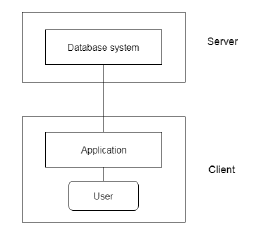
2.Two Tier Architecture
Two Tier Architecture is similar to the basic client–server model. In this architecture, the application running on the client computer directly communicates with the database stored on the server.APIs such as ODBC and JDBC are used to enable communication between the client and the database server. The user interface and application programs run on the client side, where users interact with the system.
The server side is responsible for important tasks like query processing and transaction management. To access the DBMS, the client application establishes a direct connection with the database server.
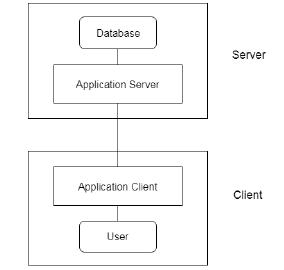
3.Three Tier Architecture
Three Tier Architecture includes an additional layer between the client and the database server. In this architecture, the client cannot communicate directly with the database server.The application on the client side interacts with an application server. This application server then communicates with the database system to process requests and send responses.
The end user does not know about the database because all communication happens through the application server. Similarly, the database only interacts with the application server, not directly with users. This architecture is commonly used in large web applications because it provides better security, scalability, and performance.
Database Models
Database models are different ways of organizing data and showing relationships between data. They help manage complex information easily. Some common database models are:
1 Hierarchical Model:
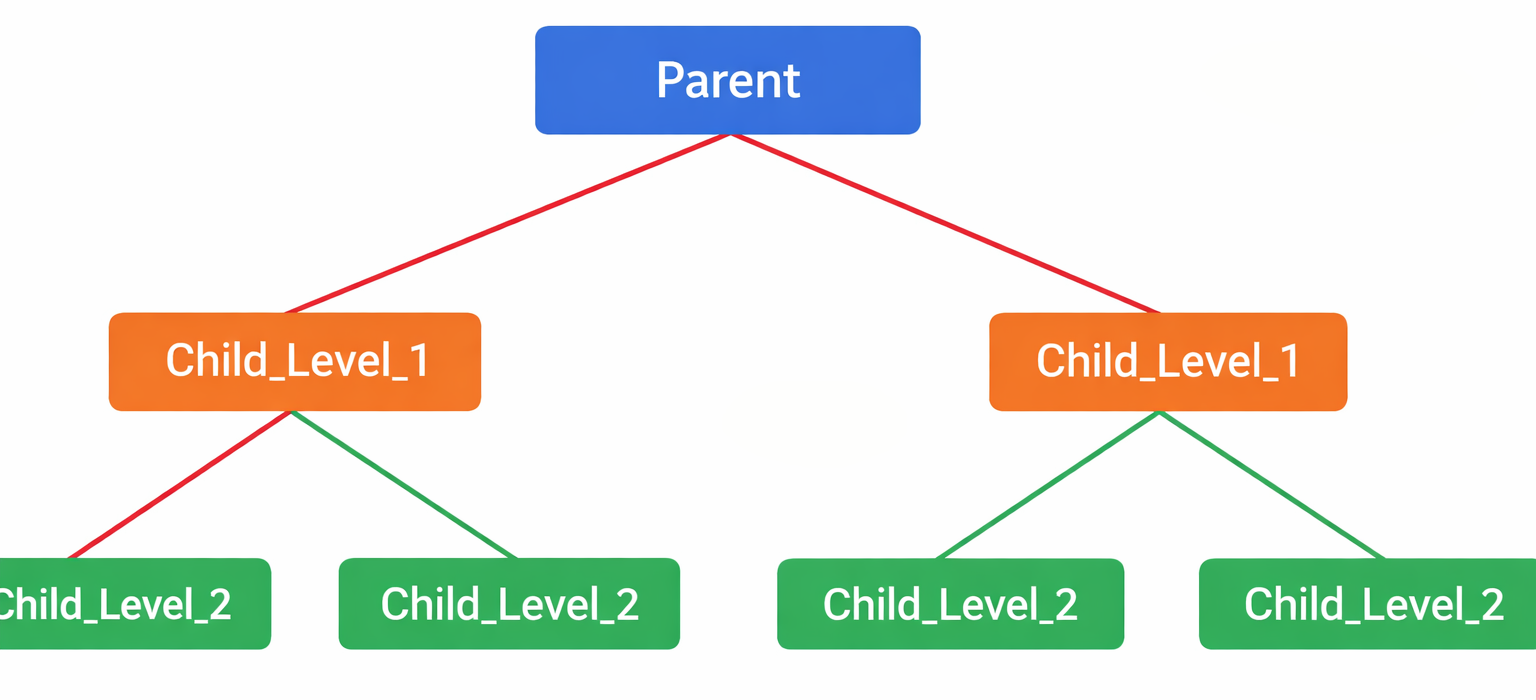
The hierarchical model organizes data in a tree-like structure. Each record has only one parent, but a parent can have many child records. This model is useful for systems that follow a clear hierarchy, such as file systems.
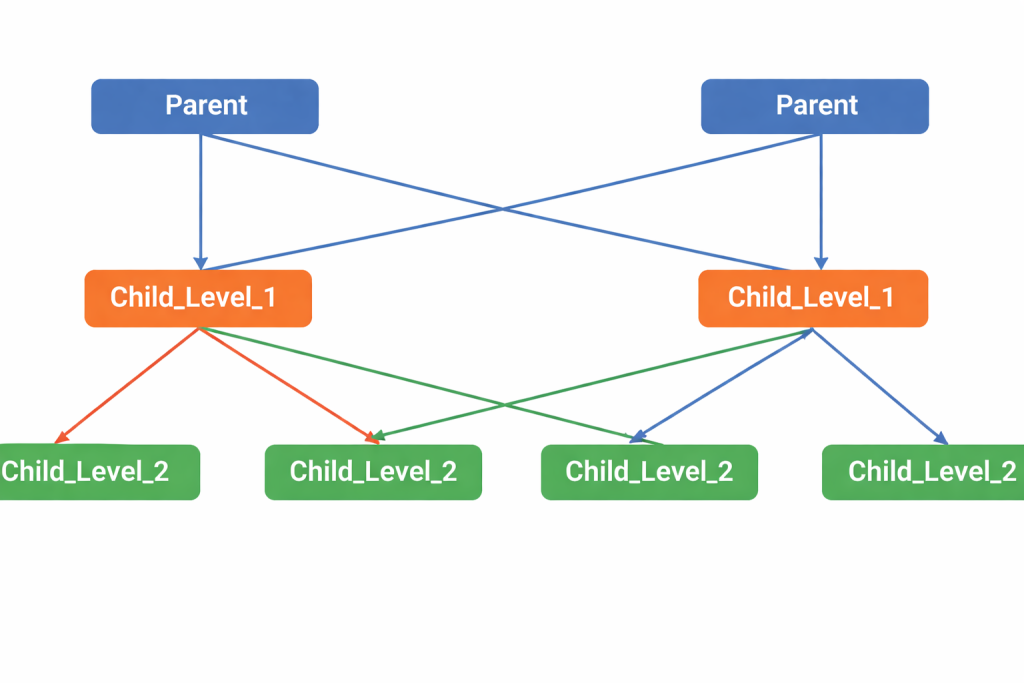
The network model is an improved version of the hierarchical model that allows multiple relationships between data. In this model, a child record can have more than one parent. It provides greater flexibility but is more difficult to design and manage.
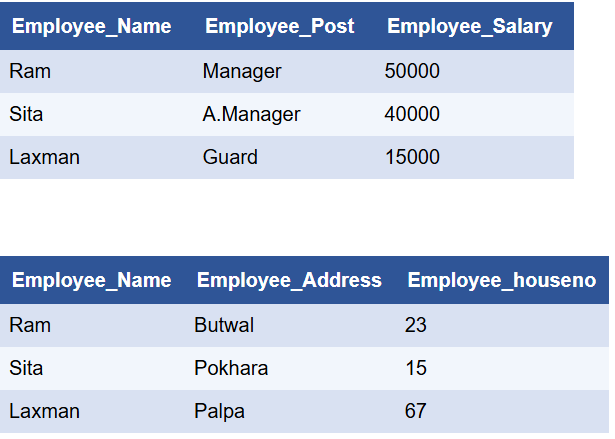
The relational model is the most commonly used database model. It organizes data into tables called relations, where rows represent records and columns represent attributes (fields). This model allows flexible data searching and management using SQL, making it suitable for applications that require frequent data processing and manipulation.
Database Schema
A database schema is a plan or structure of a database. It shows how data is organized, including tables, columns, relationships, and rules.It helps keep data organized, consistent, and easy to manage.
Types of Database Schemas
1. Physical Schema:
The physical schema describes how data is stored in the computer. It includes storage details like file organization, indexing, and partitions. It focuses on improving performance and managing data internally.
2. Logical Schema:
The logical schema shows how data is organized in the database. It includes tables, columns, and relationships between data. It focuses on the structure of the database, not on storage.
3. View Schema (External Schema):
The view schema shows what data a user can see. It provides different views for different users to make data simple and secure. It helps protect sensitive information.