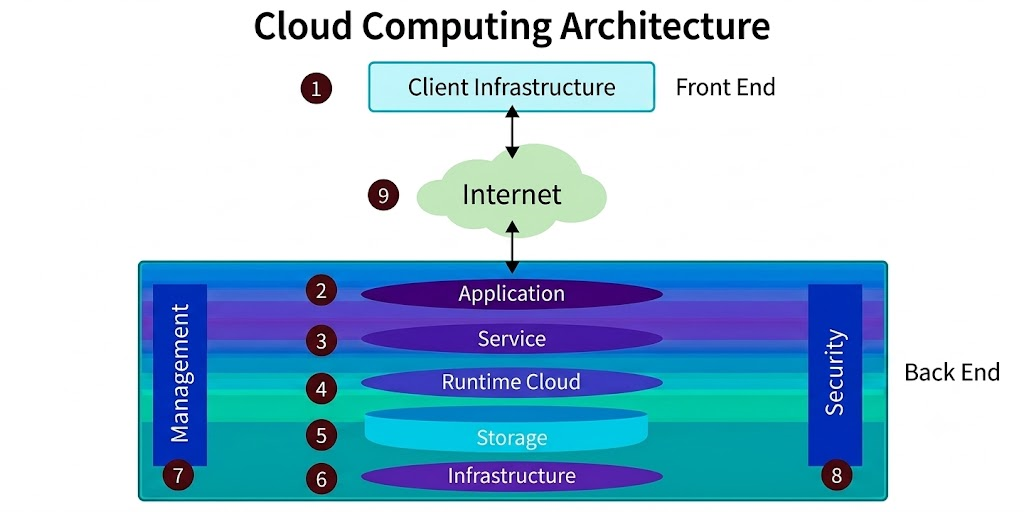
Cloud computing is a technology that allows users to access computer resources such as storage, software, and processing power over the internet instead of using their own local computer or server. In simple words, it means storing and using data and applications on remote servers that can be accessed anytime and from anywhere.
With cloud computing, users do not need to install heavy software or buy expensive hardware. They can simply connect to the internet and use services provided by companies like Google Cloud, Microsoft Azure, and Amazon Web Services (AWS)
Cloud computing has several important characteristics that make it different from traditional computing systems:
Cloud computing architecture means the different parts and technologies needed to make cloud computing work. These parts include:
3. SaaS (Software as a Service)
SaaS provides ready-to-use software applications over the internet. Users can access applications through a web browser without installing them on their devices. The provider manages updates, security, and maintenance. It is usually available on a subscription basis. Example: Gmail, Google Drive, Microsoft 365
B. Based on Deployment Models, cloud computing can be catagories as 4 types, and these are
1.Public Cloud
A public cloud is a cloud service offered over the internet and shared among multiple users. It is managed by third-party providers and is highly cost-effective. Users can access services easily, but control and customization are limited compared to private cloud.
2. Private Cloud
A private cloud is dedicated to a single organization. It offers higher security, privacy, and control over data and systems. It is commonly used by banks, government offices, and large enterprises. However, it is more expensive to maintain.
3. Hybrid Cloud
A hybrid cloud is a combination of public and private clouds. It allows organizations to store sensitive data in a private cloud while using public cloud services for less critical tasks. It provides flexibility, security, and better resource management.
4. Community Cloud
A community cloud is shared by several organizations with similar needs, such as educational institutions or government agencies. It helps in collaboration, cost sharing, and improved security compared to a public cloud.
Scope of Cloud Computing in Nepal
Cloud computing has a growing and promising scope in Nepal as digital technology is rapidly expanding in both government and private sectors. With increasing internet access and the development of IT infrastructure, cloud computing is becoming an important part of modern services.
In Nepal, the government sector is gradually adopting cloud technology for e-governance systems such as digital records, online services, and data management. This helps improve efficiency, transparency, and faster service delivery to citizens. Similarly, the education sector is using cloud-based tools for online learning, virtual classrooms, and data storage, especially after the rise of digital education.
The business sector in Nepal is also benefiting from cloud computing. Many companies use cloud services for data storage, accounting, communication, and online business operations. Small and medium enterprises (SMEs) can reduce costs by avoiding expensive hardware and using cloud-based software instead.
In addition, the growth of IT companies and startups in Nepal is increasing demand for cloud computing skills. Freelancers and developers are also using cloud platforms to build and host applications globally. This creates more job opportunities in areas like cloud administration, cybersecurity, and software development.
However, challenges such as slow internet speed in rural areas, lack of awareness, and data security concerns still exist. Despite these challenges, the future of cloud computing in Nepal is very bright as digital transformation continues to grow.
Introduction of IoT:
The Internet of Things (IoT) is a system where devices connect to the internet and share data with each other. IoT is made up of several important components. These components work together to collect, process, and exchange information.
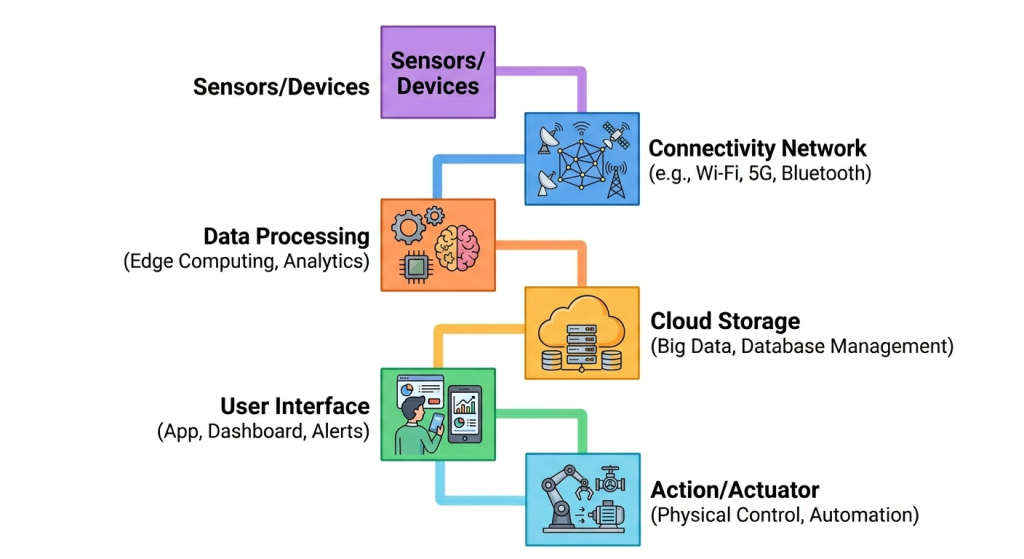
1. Devices and Sensors
Devices and sensors are the basic components of an IoT system. Sensors collect information from the surrounding environment such as temperature, humidity, pressure, motion, and light. These sensors help the system understand what is happening in real time. Examples of IoT devices include smart watches, smart bulbs, smart cameras, and smart refrigerators. Without sensors and devices, IoT systems cannot collect or send any useful information.
2. Connectivity / Network
Connectivity is the component that allows IoT devices to communicate with each other through the internet or other networks. Different technologies such as Wi-Fi, Bluetooth, Zigbee, and 5G are used for communication. Connectivity helps transfer data from sensors to cloud servers or mobile applications. Without connectivity, IoT devices cannot share information or work together properly.
3. Data Processing
Data processing is the stage where the collected data is analyzed and converted into useful information. After receiving data from sensors, the system processes it to make decisions automatically. This processing may happen inside the device, on local servers, or in cloud systems.
4. Cloud Storage
Cloud storage is used to store IoT data on internet-based servers. It allows users to access information from anywhere at any time. Cloud systems can store huge amounts of data safely and securely. They also help in data backup, management, and analysis.
5. User Interface (UI)
The user interface is the part of the IoT system through which users interact with smart devices. It may include mobile applications, websites, dashboards, or voice assistants. . It also helps users monitor system performance and receive notifications or alerts. Examples include smart home apps and industrial monitoring dashboards.
6. Security System
Security is a very important component of IoT because devices are connected to the internet. IoT security protects devices, networks, and data from hackers and cyber attacks. Security methods such as passwords, encryption, firewalls, and authentication are used to keep information safe.
Types Of IoT Wireless Networks
IoT wireless networks are communication technologies that connect smart devices without using physical cables.
1. Wi-Fi
Wi-Fi is one of the most common wireless technologies used in IoT systems. It allows devices to connect to the internet through wireless routers. Wi-Fi provides high-speed communication and supports large amounts of data transfer. It is mostly used in homes, offices, and smart buildings. Smart TVs, smart bulbs, security cameras, and smart appliances commonly use Wi-Fi connectivity. However, Wi-Fi consumes more power compared to some other IoT wireless technologies.
Examples
- Smart home systems
- Smart TVs
- CCTV cameras
2. Bluetooth
Bluetooth is a short-range wireless communication technology used for connecting nearby devices. It is widely used in IoT because it consumes less power. Bluetooth is suitable for personal devices and wearable technologies. It allows devices to exchange data over short distances without internet access. Bluetooth Low Energy (BLE) is specially designed for IoT applications requiring low battery usage. This technology is commonly used in fitness trackers, wireless headphones, and smart watches. Examples
- Smart watches
- Wireless earbuds
- Fitness trackers
3. Zigbee
Zigbee is a low-power wireless communication technology mainly used for home automation and industrial IoT systems. It supports communication between many devices over short distances. Zigbee networks are very energy efficient and suitable for battery-operated devices. It creates a mesh network where devices help transmit data to other devices. Zigbee is commonly used in smart lighting systems, smart meters, and industrial monitoring systems. Examples
- Smart lighting
- Smart energy meters
- Home automation systems
4. Cellular Network (3G/4G/5G)
Cellular networks provide wireless communication through mobile network towers. IoT devices using cellular networks can communicate over long distances. Technologies such as 3G, 4G, and 5G are widely used in smart transportation, remote monitoring, and industrial systems.
5. RFID (Radio Frequency Identification)
RFID is a wireless technology used to identify and track objects using radio waves. RFID systems consist of tags and readers. The RFID reader collects information from RFID tags attached to objects. It is widely used in inventory management, attendance systems, and product tracking. RFID technology helps automate identification processes without physical contact.