
Best Web Development Tools:
Web development has become an essential part of the modern digital world. From personal blogs and educational websites to e-commerce platforms and complex web applications, every successful website depends on the right combination of web development tools. These tools help developers write code, design interfaces, manage databases, test applications, identify errors, and deploy websites efficiently.
Choosing the best web development tools can significantly improve productivity, code quality, website performance, and user experience. However, the ideal tools depend on the type of project, programming languages, development experience, and technical requirements.
In this comprehensive guide, we explore the best web development tools for beginners, professional developers, students, and businesses. We cover code editors, browser developer tools, frontend frameworks, backend technologies, database management systems, version control platforms, testing tools, and website deployment services.
What Are Web Development Tools?
Web development tools are software applications, frameworks, libraries, and online platforms that help developers create, test, manage, and maintain websites and web applications.
These tools support different stages of the development process. For example, code editors help developers write HTML, CSS, JavaScript, PHP, and other programming languages. Browser developer tools help inspect website elements and troubleshoot errors. Frameworks simplify application development, while version control systems help teams manage code changes.
Web development tools can generally be divided into the following categories:
- Code editors and IDEs: Used to write, edit, and organize source code.
- Frontend development tools: Used to build website layouts, interactive elements, and user interfaces.
- Backend development tools: Used to develop server-side logic and application functionality.
- Browser developer tools: Used to inspect, debug, and optimize websites.
- Database tools: Used to store, retrieve, update, and manage information.
- Version control tools: Used to track code changes and collaborate with other developers.
- Testing tools: Used to identify bugs and verify application functionality.
- Deployment tools: Used to publish websites and applications online.
Understanding these categories makes it easier to select the right tools for a particular project.
1. Visual Studio Code (VS Code)
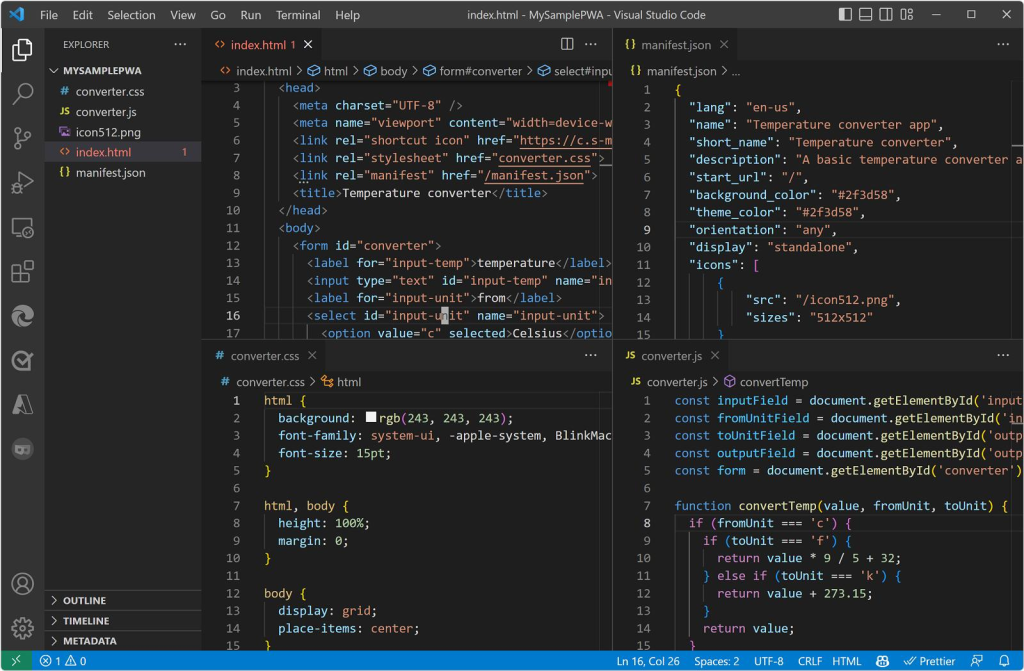
Visual Studio Code, commonly known as VS Code, is one of the most popular code editors for web development. Developed by Microsoft, it supports numerous programming languages and provides a flexible environment for writing and managing source code.
VS Code is suitable for beginners learning HTML, CSS, and JavaScript, as well as experienced developers building complex web applications.
Key Features of Visual Studio Code
- Intelligent code completion: Suggests code as developers type.
- Syntax highlighting: Displays programming elements in different colors.
- Integrated terminal: Allows developers to execute commands without leaving the editor.
- Debugging support: Helps identify and fix programming errors.
- Extensions: Adds support for additional languages, frameworks, formatting, and development workflows.
- Git integration: Helps manage source code changes.
- Customizable interface: Supports themes, keyboard shortcuts, and personalized settings.
- Developers can install extensions for HTML, CSS, JavaScript, PHP, Python, React, and many other technologies.For example, students learning web development can create an HTML file, add CSS styling, write JavaScript functions, and preview their work using a browser or a suitable live-preview extension.
Best for: Beginners, students, frontend developers, backend developers, and full-stack developers.
Website: https://code.visualstudio.com/
2. Google Chrome Developer Tools
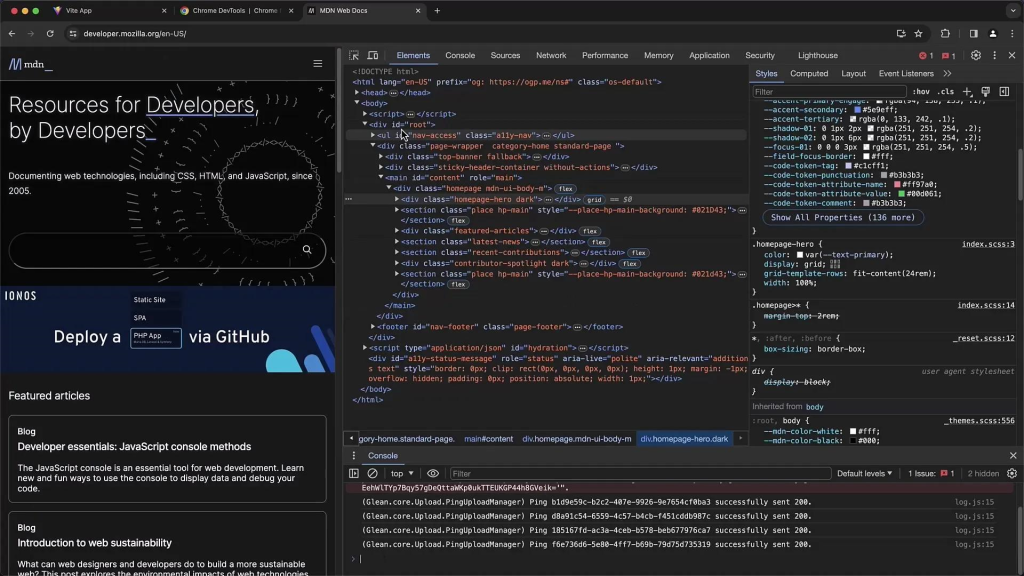
Google Chrome Developer Tools, also known as Chrome DevTools, is a collection of built-in browser utilities for inspecting, debugging, and optimizing websites.
These tools are especially useful when a website does not display correctly or when developers need to understand how HTML, CSS, and JavaScript behave in a browser.
Important Features of Chrome DevTools
Elements panel: Allows developers to inspect HTML elements and modify CSS styles temporarily.
Console panel: Displays JavaScript errors, warnings, and debugging messages. Developers can also execute JavaScript directly in the console.
Network panel: Shows requests for HTML documents, images, stylesheets, scripts, fonts, and API responses. It helps identify slow resources and failed requests.
Sources panel: Supports debugging JavaScript using breakpoints and step-by-step execution.
Device emulation: Allows developers to preview responsive layouts at different screen sizes.
Performance panel: Helps investigate rendering problems, long-running scripts, and performance bottlenecks.
For example, if a navigation menu appears incorrectly on mobile devices, developers can use device emulation and the Elements panel to investigate the layout and test CSS changes.Chrome DevTools does not require a separate paid subscription or installation because it is included with Google Chrome.
Best for: Debugging, responsive design testing, performance analysis, and website troubleshooting.
Website: https://developer.chrome.com/docs/devtools/
3. Git and GitHub
Git is a distributed version control system that tracks changes in source code. GitHub is an online platform that hosts Git repositories and provides collaboration features.
These tools are important for individual developers and development teams because they help maintain a history of code changes and support collaboration.
Why Are Git and GitHub Important?
Version tracking: Developers can review previous changes.
- Branching: New features can be developed separately from the main codebase.
- Collaboration: Multiple developers can contribute to the same project.
- Backup: Remote repositories provide an additional copy of project files.
- Code review: Pull requests allow teammates to review proposed changes.
- Portfolio development: Public repositories can demonstrate programming skills to employers.
Common Git commands include:
git init
git add .
git commit -m "Initial commit"
git status
git push
git pull
Developers typically configure a remote repository before using git push to upload their commits.For students, GitHub can serve as a portfolio for HTML projects, CSS designs, JavaScript applications, PHP systems, and other programming assignments.Best for: Version control, teamwork, open-source projects, and developer portfolios.
4. Figma: A Powerful Web Design Tool
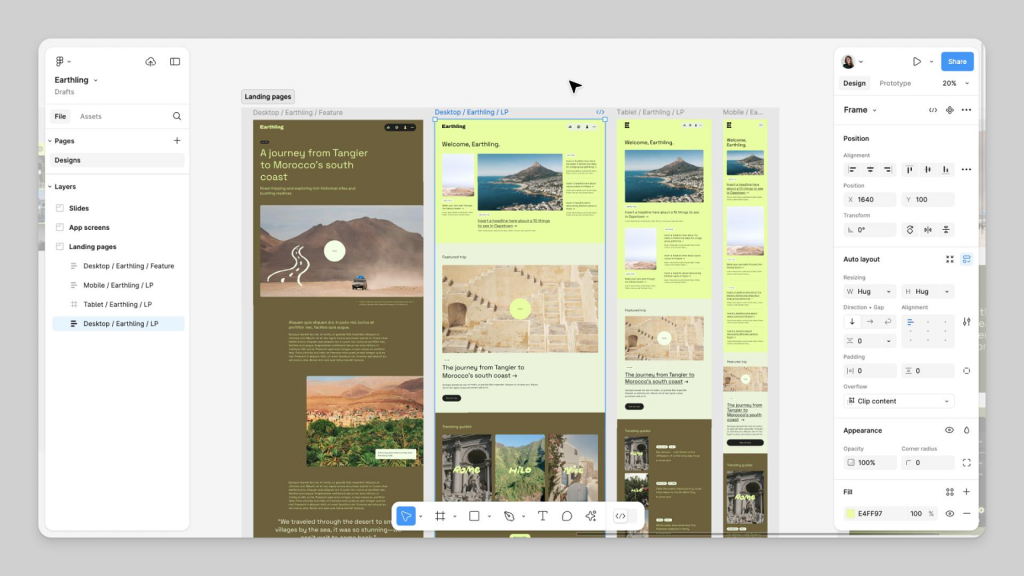
Figma is a collaborative design platform used to create website layouts, user interfaces, wireframes, and interactive prototypes.Before writing HTML and CSS, developers and designers can use Figma to plan how a website should look and behave.
Main Features of Figma
- Wireframing: Creates basic website structures before detailed design begins.
- UI design: Supports buttons, navigation bars, forms, cards, and page layouts.
- Prototyping: Connects design screens to demonstrate user interactions.
- Collaboration: Allows team members to review and comment on designs.
- Reusable components: Helps maintain consistency across multiple pages.
- Design specifications: Helps developers understand spacing, colors, typography, and component dimensions.
- For example, when designing a school website, a team can prepare the homepage, admission page, notice section, teacher profiles, and contact page in Figma before implementing the design.
Figma is particularly useful for projects where visual consistency and user experience are important.Best for: UI/UX designers, frontend developers, design teams, and website planning.
Website: https://www.figma.com/
5. React: A Popular Frontend Library
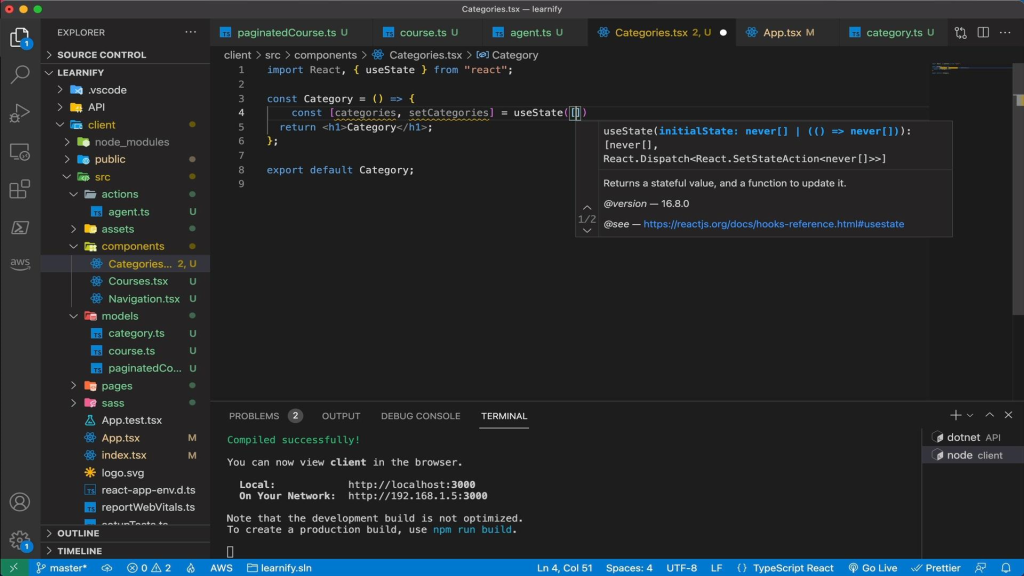
React is a JavaScript library for building user interfaces. It is widely used for interactive websites, dashboards, single-page applications, and web applications with reusable interface components.
React allows developers to divide an interface into smaller components. Each component can manage a particular part of the page, making applications easier to organize and maintain.
Key Features of React
- Reusable components: Build interface elements once and reuse them.
- Declarative development: Describe the desired interface based on application data.
- State management: Update interface elements when application data changes.
- Large ecosystem: Access libraries for routing, forms, data fetching, and other functionality.
- Developer tools: Inspect components and investigate application behavior.
- For example, an online learning platform might include reusable components for course cards, student profiles, login forms, video lessons, and examination results.
- React is a strong choice for interactive applications, but a simple static website may not require it. Developers should choose the technology that matches the project’s complexity.
Best for: Interactive user interfaces, dashboards, educational platforms, and single-page applications.
Website: https://react.dev/
6. Bootstrap: A Responsive CSS Framework
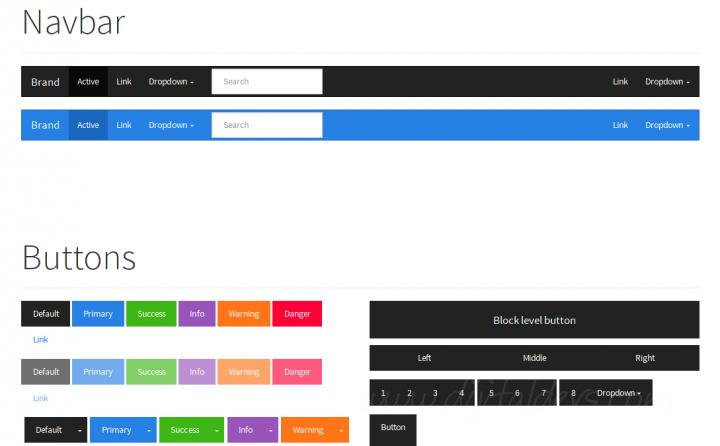
Bootstrap is a frontend framework that provides CSS styles and JavaScript components for building responsive websites.
Instead of writing every style from scratch, developers can use Bootstrap’s grid system, buttons, forms, navigation bars, cards, modals, and other components.
Advantages of Bootstrap
- Responsive grid system: Helps create layouts for different screen sizes.
- Predefined components: Reduces repetitive CSS work.
- Consistent styling: Makes it easier to maintain a uniform interface.
- Utility classes: Simplifies spacing, alignment, display, and typography adjustments.
- Documentation: Provides examples and guidance for common components.
For instance, developers can build a responsive school website with a navigation bar, student admission form, announcement cards, and footer using Bootstrap classes.
Bootstrap is useful when development speed matters. However, customization may be necessary to create a distinctive design rather than a generic framework appearance.Best for: Beginners, educational websites, administrative dashboards, and responsive business websites.
Website: https://getbootstrap.com/
7 WordPress: A Website Development Platform
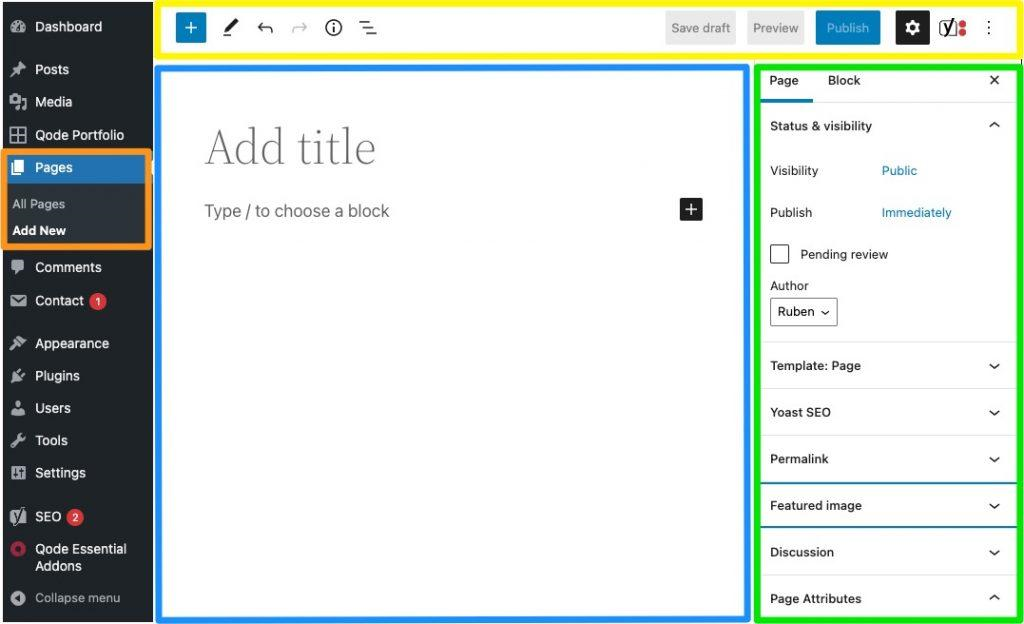
WordPress is a content management system (CMS) used to create blogs, educational websites, business websites, news portals, and online stores.It allows users to publish and manage content without building every feature from scratch.
Main Features of WordPress
- Content creation and editing.
- Themes for website design.
- Plugins for extending functionality.
- User roles and permissions.
- Media library management.
- Search engine-friendly content structures.
- Support for e-commerce through plugins such as WooCommerce.
WordPress can be suitable for school websites that need to publish notices, examination schedules, academic resources, teacher profiles, and educational articles.
Users can choose a visual page builder or customize themes with HTML, CSS, JavaScript, and PHP. For security and performance, WordPress installations should use maintained themes and plugins, regular backups, secure administrator accounts, and appropriate caching.Best for: Bloggers, educators, content publishers, small businesses, and organizations.
Website: https://wordpress.org/
8 PHP and XAMPP: Useful Tools for Beginners
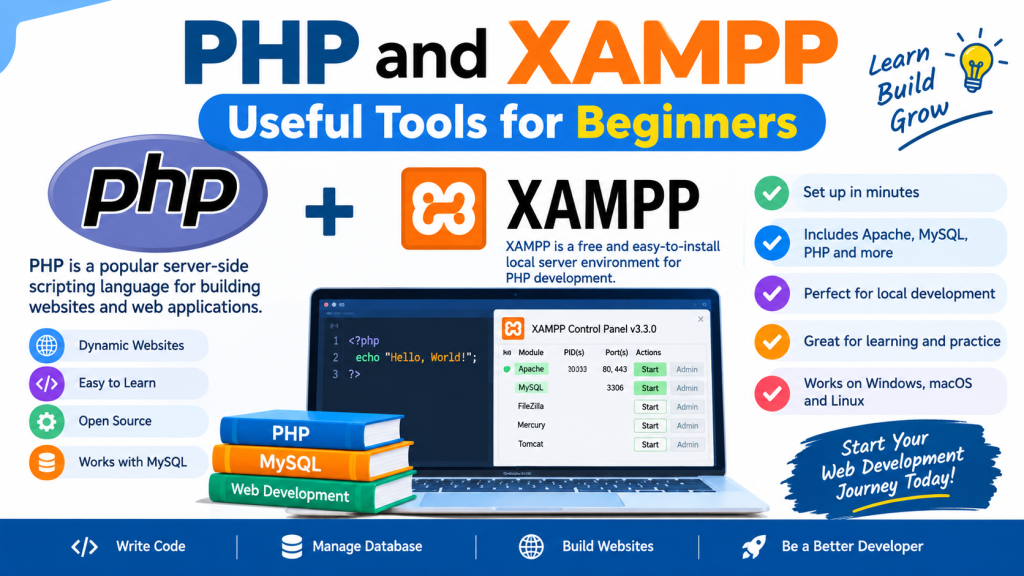
PHP is a server-side scripting language commonly used to develop dynamic websites and web applications. XAMPP is a local development package that provides Apache, MariaDB, PHP, and other components.
Together, PHP and XAMPP offer a practical environment for learning backend development on a personal computer.
What Can Developers Build with PHP and XAMPP?
- Student registration systems.
- Login and logout functionality.
- School management applications.
- Contact forms.
- Content management systems.
- CRUD applications.
- Database-driven websites.
CRUD stands for Create, Read, Update, and Delete. These operations form the foundation of many database applications.For example, a student management system can use PHP to process forms, MariaDB to store student records, and HTML/CSS to display the user interface.
A basic development workflow involves installing XAMPP, starting Apache and the database service, creating a project folder inside the web server’s document root, and writing PHP code.
For production systems, developers must implement password hashing, prepared SQL statements, session security, access controls, and HTTPS. Best for: Students, PHP beginners, local testing, and database-driven websites.
Websites: PHP | Apache Friends XAMPP
Comparison of the Best Web Development Tools
The following table summarizes the main purposes of popular web development tools.
Tool | Primary purpose | Best suited for |
|---|---|---|
Visual Studio Code | Code editing | Beginners and professionals |
Chrome DevTools | Debugging and inspection | Frontend developers |
Git | Version control | All developers |
GitHub | Code hosting and collaboration | Teams and portfolios |
Figma | Interface design | Designers and frontend teams |
React | User interfaces | Interactive web applications |
Bootstrap | Responsive styling | Beginners and business websites |
Tailwind CSS | Utility-based styling | Custom interfaces |
Node.js | Server-side JavaScript | Backend developers |
Express.js | Web server and APIs | Node.js applications |
PHP | Server-side programming | Dynamic websites |
XAMPP | Local development environment | PHP beginners |
MySQL | Relational database | Database-driven applications |
Postman | API testing | Backend and integration teams |
Vite | Frontend development and builds | Modern frontend projects |
WordPress | Content management | Blogs and school websites |
Docker | Containerization | Teams and deployment workflows |
Playwright | Automated browser testing | Quality assurance |
Lighthouse | Website auditing | Performance and SEO |
Laravel | PHP application framework | Structured PHP projects |
Django | Python web framework | Database-driven applications |
Visual Studio | Integrated development | .NET developers |
ESLint | Code analysis | JavaScript projects |
Prettier | Code formatting | Development teams |
Best Web Development Tools for Different Projects
Different types of websites require different development approaches.
Project type | Recommended tools |
|---|---|
Personal portfolio | VS Code, HTML, CSS, JavaScript, GitHub |
School website | WordPress or PHP, Bootstrap, MySQL/MariaDB |
Online learning platform | React, Node.js or Django, database, Playwright |
E-commerce website | WordPress with WooCommerce or a custom application |
REST API | Node.js with Express, Django, or Laravel; Postman |
Static business website | HTML, CSS, JavaScript, Vite if needed |
Enterprise web application | Visual Studio, ASP.NET Core, Git, automated testing |
Database management system | PHP or Laravel, MySQL/MariaDB, Git |
Responsive web application | React or another suitable frontend framework, browser DevTools |
Python-based web application | Django, VS Code, database tools, Git |
These combinations are starting points rather than mandatory technology stacks. A small project may need fewer tools, while a large application may require additional security, monitoring, testing, and deployment services.