
What is a Computer?
A computer is an electronic device that can process data, perform calculations, and execute tasks according to a set of instructions (software). Computers are used for various functions, from running applications to storing large amounts of information.
They perform these tasks faster and more accurately than humans, making them essential for personal, educational, business, and scientific purposes.

Functional Block Diagram of a Computer:
A computer is an electronic device that converts raw data into meaningful information, carrying out various processes as instructed by the program. The block functional block diagram of the computer system is shown below.
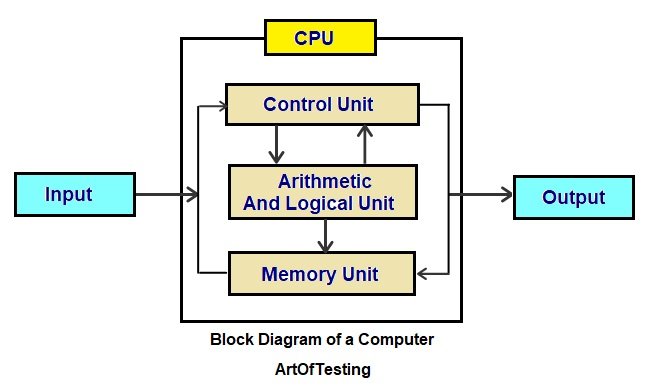
The function block diagram of a computer is shown diagram above. It includes the input unit, the Central processing unit, the Control unit, Arithmetic Logic unit, Memory unit, and out output unit.
- The Input Unit is a part of the computer system that takes data and instructions from the user and converts them into a form that the computer can understand (binary form).
- The Central Processing Unit (CPU) is the main part of a computer that processes data and instructions to produce useful information.
It performs all calculations, logical decisions, and controls the flow of data inside the computer. - The Arithmetic and Logic Unit (ALU) is the part of the CPU that carries out all mathematical and logical operations.
It helps the computer to perform calculations and make decisions. - The Memory Unit is the part of the computer that stores data, instructions, and results either temporarily or permanently.
- The Output Unit is the part of the computer that displays or gives the processed information to the user in a readable form.
Characteristics of Computers
Computers possess certain features that make them extremely efficient and useful:
- Speed: Computers can perform tasks in milliseconds, making them much faster than humans.The different units of storage are shown below.

- Accuracy: Computers execute tasks with incredible precision, reducing the risk of errors compared to manual processes.
- Automation: Once programmed, computers can complete tasks automatically without human intervention. For example, a computer can send emails or perform system backups without being prompted.
- Versatility: Computers can be adapted to do nearly any task. Whether it’s writing, designing graphics, or running complex simulations, computers can handle it all.
The Evolution of Computers
The evolution of computers spans many decades, marked by incredible technological advancements. Let’s break down the journey of computers through different generations.
Generations of Computers
The generation of computers means the different stages of computer development over time. Each generation of computer is marked by a major technological improvement, such as changes in hardware, size, speed, memory, and language used.
The development of computers can be divided into five major generations, each defined by a significant technological advancement.
First Generation (1940-1956)
- The first generation of computers used vacuum tubes for processing data. These computers were large, bulky, and consumed a lot of power.
- They were mostly used for scientific and military calculations, as they were too expensive for everyday use. Some examples include the ENIAC (Electronic Numerical Integrator and Computer) and UNIVAC (Universal Automatic Computer).
- Technology Used: Vacuum tubes
- Size: Huge, occupying entire rooms
- Examples: ENIAC, UNIVAC
Advantages of First-Generation Computers:
- They were the first computers ever made and started the development of computer technology.
- They could perform calculations faster than humans.
- Helped in scientific research and military purposes (like missile calculations).
Disadvantages of First-Generation Computers:
- They were very large in size, room-sized machines and difficult to move or install.
- The vacuum tubes consumed a lot of power, making them expensive to operate.
- Vacuum tubes generated a lot of heat and often got damaged.
- Required a large amount of electricity to operate.
Second Generation (1956-1963)
The second generation of computers replaced vacuum tubes with transistors. Transistors were smaller, more efficient, and consumed less power, allowing for the development of smaller and more reliable computers. These computers were used for tasks in business, engineering, and scientific fields.
- Technology Used: Transistors
- Size: Smaller than first-generation computers
- Examples: IBM 7090, CDC 1604
Advantages of Second-Generation Computers:
- They were Smaller in size than first-generation computers.
- They were Faster in processing speed.
- They were more reliable and produced less heat.
- They consumed less power than the first generation of computers.
- Easier to program using high-level languages.
- Required less maintenance.
- More accurate and efficient in operation.
Disadvantages of Second-Generation Computers:
- Still very expensive to purchase.
- Required air conditioning for cooling.
- Needed regular maintenance.
- Not portable due to its large size.
- Used punch cards for input and output.
- Limited storage capacity.
Third Generation (1964-1971)
The third generation saw the invention of integrated circuits (ICs), which further reduced the size and cost of computers. With integrated circuits, a large number of components could be placed on a single chip, allowing for faster and more efficient processing.
- This period also marked the advent of keyboards and monitors for interaction.
- Technology Used: Integrated Circuits (ICs)
- Size: Smaller, more affordable, and faster
- Examples: IBM 360, PDP-8
Advantages of Third-Generation Computers:
- They were smaller in size but more powerful than earlier computers. This made them easier to place and use in different locations.
- They used less electricity and produced less heat. This helped reduce energy costs and overheating problems.
- They were faster and more reliable in processing data. This improved overall performance and accuracy.
- They could run many programs at the same time (multitasking). This allowed users to work more efficiently.
- They were easier to use and became more affordable. More people and businesses could buy and use them.
- They used integrated circuits (ICs) instead of transistors. This made them work faster and with better performance.
Disadvantages of Third-Generation Computers:
- The technology of integrated circuits (ICs) was still expensive. This made the initial cost of computers quite high.
- They required cooling systems to prevent overheating. This added to the cost and complexity of maintenance.
- Skilled people were needed to operate and maintain them. It was not easy for everyone to understand and use them.
- Manufacturing ICs was a difficult and complex process. It required special equipment and clean environments.
- Although smaller than before, they were still quite large. They still needed a dedicated space for setup.
Fourth Generation (1971-Present)
The Fourth Generation of Computers used microprocessors, which placed thousands of electronic components on a single chip. This made computers smaller, faster, cheaper, and more powerful. This revolutionized computing by making computers even smaller and more powerful. Personal computers (PCs) became widely available during this period, and the internet began to emerge.
- Technology Used: Microprocessors
- Size: Compact, affordable
- Examples: Apple II, IBM PC, early personal computers.
Advantages of Fourth-Generation Computers:
- Smaller and more affordable: ICs allowed for even smaller, more cost-effective computers.
- Increased processing power: ICs enabled faster processing speeds, allowing computers to perform more tasks in less time.
- Greater reliability: Integrated circuits were less prone to failure compared to previous technologies.
Disadvantages of Fourth-Generation Computers:
- Still not personal: Though smaller, computers were still expensive and often used only in business or scientific applications.
- Limited software development: Despite advancements in hardware, software still had limitations in terms of accessibility and capabilities.
Fifth Generation (Present and Beyond)
The fifth generation of computers is still in development. It focuses on artificial intelligence (AI), quantum computing, and other advanced technologies. Computers are becoming capable of performing tasks that require human-like thinking, such as speech recognition, decision-making, and problem-solving.
Quantum computers, which use quantum mechanics to process information, hold the potential to revolutionize computing even further.
- Technology Used: Artificial Intelligence, Quantum Computing
- Size: Varies, with some machines being quite compact
- Examples: AI-based systems, quantum computers
Advantages of Fifth-Generation Computers:
- AI and automation: These computers have the potential to perform complex tasks like human-like decision-making, speech recognition, and autonomous driving.
- Quantum computing: Quantum computers could revolutionize computing by solving problems that are currently too complex for traditional computers.
- Fast and efficient: They promise to process data much faster and handle much larger datasets than current systems.
Disadvantages of Fifth-Generation Computers:
- High cost: Advanced technologies like quantum computing are still extremely expensive and not widely available.
- Early stages of development: AI and quantum computing are still in their infancy, and there are many technical hurdles to overcome.
- Ethical concerns: AI systems raise questions about privacy, data security, and job displacement as automation increases.
Classifying Computers
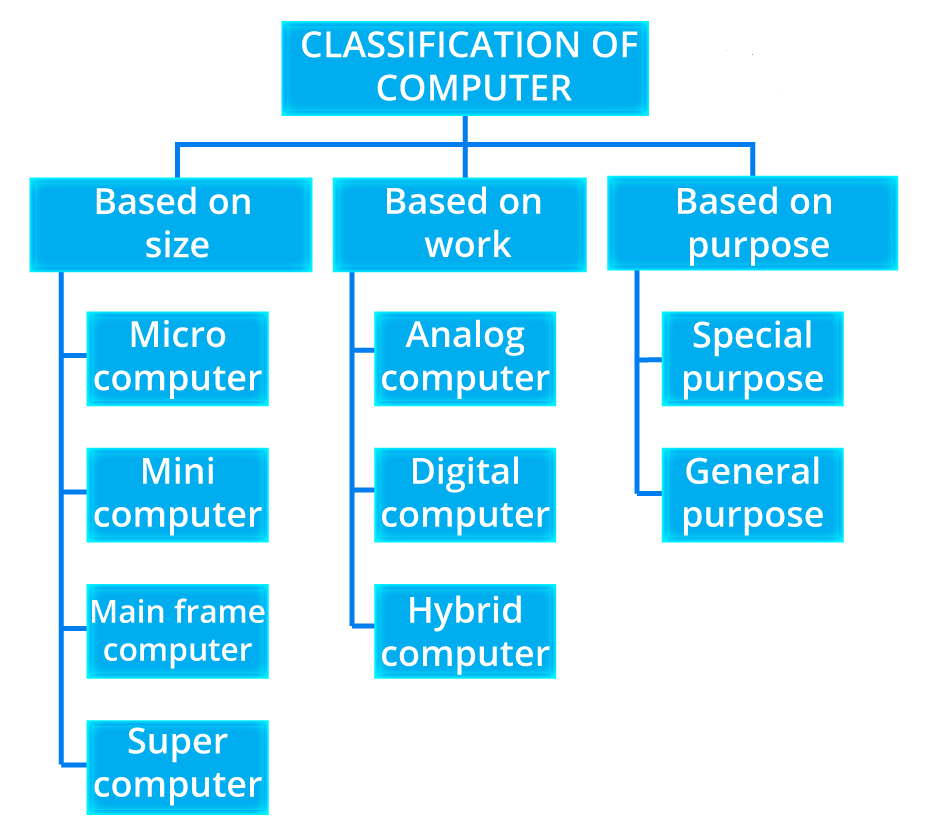
Classifying Computers Based on Size
Another way to classify computers is by their size. The size of a computer determines its power, how much data it can handle, and the specific tasks it is designed to perform. According to size, computers can be classified into 4 types
1. Microcomputers: Microcomputers are the most common and widely used type of computer. They are small and affordable, making them ideal for personal use. Examples include desktops, laptops, and smartphones. These computers are suitable for everyday tasks like browsing the web, word processing, and playing games.
2 . Minicomputers: Minicomputers are larger and more powerful than microcomputers, typically used in business and industrial settings. They can handle more data and are used for tasks such as managing inventory or controlling production lines.
3. Mainframe Computers: Mainframes are large, powerful computers used by large organizations like banks, government agencies, and research labs. They can handle vast amounts of data and perform complex tasks, such as processing thousands of transactions every second.
4. Supercomputers: Supercomputers are the most powerful type of computer. They are capable of performing millions of calculations per second and are used for highly complex tasks, such as weather forecasting, scientific simulations, and climate modeling.
Classifying Computers Based on Purpose
Computers can also be categorized based on their intended use. This classification includes general-purpose computers and special-purpose computers.
1. General-Purpose Computers: These computers are designed to perform a wide variety of tasks. A desktop PC or laptop is a general-purpose computer, as it can be used for tasks like creating documents, surfing the web, or playing games.
Special-Purpose Computers: Special-purpose computers are designed to perform specific tasks. For instance, a computer in a car may be used to control the engine’s performance, or a computer in a medical device may monitor a patient’s heart rate.
Classifying Computers Based on Data Type
Computers can also be categorized based on the type of data they handle.
1. Analog Computers: Analog computers are special-purpose computers which can measure continuously changing data such as pressure, temperature, voltage, etc. It can perform a single task. For example, speedometer which displays speed of vehicles, voltmeter, analog watch, seismograph, etc. The features of analog computer are given below:
- cheaper than other device.
- on continuous data.
- storage capacity is low.
- works in real-time.
- gives output in the form of graph and signals.
2. Digital Computers:Digital computers are general-purpose computers which solve problems by computing discrete data. It works on digital values, binary digits (0 or 1). It can perform many tasks according to user requirements. Computer in school, home and office are examples of digital computer.
Feature of digital computer
- works on discontinuous.
- highly accurate and reliable.
- used for general purpose.
- based on discrete data (digit 0 and 1).
3. Hybrid Computers: Hybrid computers combine features of both analog and digital computers. They are useful in situations where both types of data need to be processed simultaneously, such as in healthcare systems that monitor vital signs while performing data analysis.
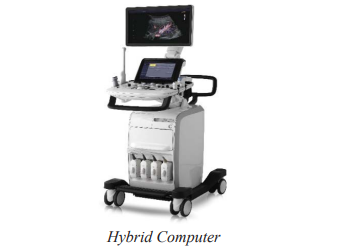
- Feature of hybrid computer expensive
- designed for special purpose
- works on both has continuous and discrete value
- more complex and limited storage
Computer Models:
Different models of computers are designed for different uses. Here are some of the most common types:
Desktop Computers:
- These are larger machines that are typically used in one place, such as an office or home. They are powerful and ideal for tasks like work, gaming, or multimedia use.
Laptop Computers:
- Laptops are portable computers that can be used anywhere. They are lightweight and convenient for people who need to work on the go, such as students or business professionals.
Tablet Computers:
- Tablets are small, portable devices that rely on a touchscreen for input. They are primarily used for browsing the internet, reading e-books, or watching videos.
Servers and Workstations:
- Servers are powerful computers that provide services to other computers in a network. Workstations are high-performance systems designed for tasks like graphic design, 3D rendering, or scientific research.
Applications of Computers:
Computers have a wide range of applications across various fields:
Computers in Healthcare:
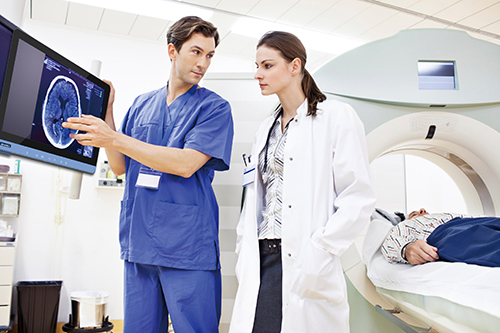
A computer is used in scanning and diagnosing of various diseases through CT scan (Computed Tomography scan), ultrasounds, ECG (Electro Cardio Graph) etc. It is also used in hospitals to keep records of patients and medicines. Nowadays, computer is used in surgery too. Doctors use computer and Internet services to provide telemedicine services to remote areas of our country, Nepal.
Computers in Education:
In education, computers have transformed how students learn by providing access to online courses, virtual classrooms, and educational resources.
Computers in Business and Industry
In the business world, computers are used for managing data, automating tasks, and communicating with clients. In industries, computers control machinery, manage inventory, and optimize production.
Scientific Research
A computer is used in all types of scientific research. Scientists collect the latest information by using internet all over the world. It is used in weather forecasting, space research, complex research in various scientific fields etc.
Conclusion:
- In conclusion, computers have evolved significantly from their early beginnings to become the powerful and versatile tools we use today. Understanding the different generations of computers, along with their classifications based on size, purpose, and data type, helps us appreciate how far technology has come. As computers continue to evolve, their role in our personal and professional lives will only grow.
Frequently Asked Questions (FAQs)
1. What are the main types of computers?
The main types of computers include microcomputers (personal computers), minicomputers (used in businesses), mainframe computers (used by large organizations), and supercomputers (used for scientific research and complex calculations).
2. What is the first generation of computers?
The first generation of computers used vacuum tubes for processing data. These computers were very large and inefficient but were important for early computing.
3. What is the difference between analog and digital computers?
Analog computers deal with continuous data, while digital computers handle discrete data in binary form (0s and 1s). Digital computers are more commonly used today.
4. What is a hybrid computer?
A hybrid computer combines both analog and digital features, allowing it to process both continuous and discrete data.
5. How do computers impact healthcare?
Computers are used in healthcare to assist with patient diagnostics, storing medical records, and even performing surgeries with robotic assistance.
6. What are supercomputers used for?
Supercomputers are used for extremely complex tasks, such as weather forecasting, scientific research, and simulations that require vast computational power.
compile By Er. Basant kunar yadav