
What Is Network Architecture?
Network architecture is the overall design and structure of a computer network. It defines how computers, servers, networking devices, applications, and other components communicate and share resources. It also describes the rules, protocols, services, and security mechanisms used to exchange data across a network.
A well-designed network architecture helps organizations build reliable, secure, scalable, and efficient communication systems. It is used in homes, schools, offices, hospitals, data centers, cloud platforms, and large enterprises.
For example, when you access a website, your device sends a request through a network to a web server. The server processes the request and sends the required webpage back to your device. The arrangement of these devices, services, and communication rules is part of the network architecture.
How Does Network Architecture Work?
Network architecture works by defining how network components connect, communicate, and exchange information. Different devices perform different functions, depending on the architecture.
The main components include:
- Client devices: Computers, smartphones, tablets, and other devices that access network resources.
- Servers: Computers or systems that provide services, files, applications, or data to clients.
- Switches: Devices that connect devices within a local area network (LAN).
- Routers: Devices that forward packets between different IP networks.
- Communication protocols: Rules such as TCP/IP, HTTP, HTTPS, and DNS that enable communication.
- Security devices and services: Firewalls, access controls, and other mechanisms that protect network resources.
For example, in a school computer lab, computers may connect to a switch and access a shared server or the internet through a router. The network architecture determines how these resources are organized and how users access them.
Types of Network Architecture
Network architecture can be classified in several ways. The following seven models and patterns are commonly used in computer networking and system design. They are not mutually exclusive; a network can combine several of them.
1. Client-Server Architecture
Client-server architecture is a network model in which client devices request services or resources from a server. The server processes requests and provides the appropriate response.For example, when you log in to an online learning platform, your browser sends a request to a web server. The server may verify your credentials, retrieve course information, and return the results.

Features:
- Servers provide centralized services and resources.
- Users access services through client applications.
- Authentication and access permissions can be managed centrally.
- Servers can be upgraded to support additional users and workloads.
Advantages:
- Centralized management of data and services.
- Easier implementation of consistent access controls.
- Convenient backup and maintenance of centrally stored data.
- Suitable for websites, business applications, and educational platforms.
Disadvantages:
- Server failures can interrupt dependent services unless redundancy is provided.
- Servers and administration can increase costs.
- Heavy workloads can cause performance bottlenecks if capacity is insufficient.
Applications: Websites, email services, online banking, school management systems, and enterprise applications.
2. Peer-to-Peer (P2P) Architecture
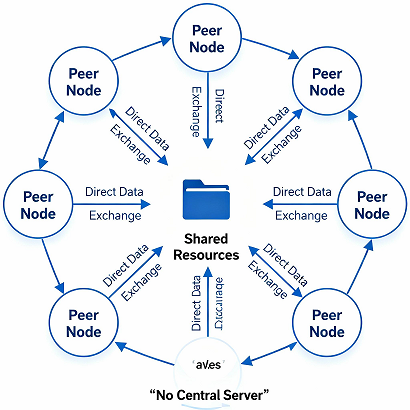
Peer-to-peer architecture allows computers, called peers, to share resources directly with one another without requiring a dedicated central server for every sharing activity.
Each peer may act as both a client and a provider of resources. For example, a peer may download parts of a file from other peers while simultaneously sharing parts it already has.
Features:
- Resources can be shared directly between peers.
- A dedicated central server may not be necessary for basic sharing.
- Management and security may be distributed across participating devices.
- Some implementations use centralized discovery or coordination services.
Advantages:
- Can reduce the need for dedicated server infrastructure.
- Supports direct resource sharing.
- Can distribute workloads across multiple peers.
- May improve availability when multiple peers hold the same data.
Disadvantages:
- Security and access control can be harder to manage consistently.
- Availability depends on which peers are online and what resources they hold.
- Data backup and administration may be more complicated.
- Performance can vary with network conditions and peer capacity.
Applications: Peer-to-peer file sharing, distributed content delivery, and some distributed communication systems.
3. Hybrid Network Architecture
Hybrid network architecture combines two or more architectural approaches. A common example combines client-server services with peer-to-peer resource sharing.
For instance, a system may use a central server to authenticate users and coordinate activities while allowing devices to exchange certain files directly.
Features:
- Combines centralized management with distributed resource sharing.
- Can be adapted to different application requirements.
- Allows organizations to balance control, flexibility, and performance.
- May require more careful integration and management.
Advantages:
- Offers flexibility in network design.
- Can balance centralized security with distributed resource use.
- Allows different services to use different communication models.
- Can support changing business and technical requirements.
Disadvantages:
- Design and troubleshooting may be more complex.
- Integration can increase management overhead.
- Security policies must cover all participating components.
Applications: Business networks, collaborative platforms, communication systems, and systems that combine centralized authentication with distributed services.
4. Centralized Network Architecture
Centralized network architecture places important management functions, data, or services under a central system or a small number of central systems.
For example, a school may use a central server to manage student records, user accounts, and shared files. Authorized computers access these services over the network.
Features:
- Important resources or controls are managed centrally.
- Administration can be standardized.
- Monitoring and access policies can be coordinated.
- Dependent services may require redundancy to remain available during failures.
Advantages:
- Simplifies administration and policy enforcement.
- Makes centralized monitoring easier.
- Supports consistent data management.
- Can simplify backup procedures for centrally stored information.
Disadvantages:
- A central failure can affect many users if redundancy is absent.
- Central systems may become performance bottlenecks.
- Expansion may require additional central capacity.
- Centralized resources can become attractive targets for attackers.
Applications: Centralized databases, enterprise authentication, school management systems, and managed file servers.
5. Decentralized Network Architecture
Decentralized network architecture distributes control, processing, or data across multiple systems rather than relying entirely on one central authority.
For example, a distributed organization may operate services across several locations, with each location maintaining some local resources and control.
Features:
- Functions are distributed among multiple systems.
- Individual components may continue working when another component fails.
- Data and management responsibilities may be shared.
- Coordination and consistency may require additional mechanisms.
Advantages:
- Can reduce dependence on a single central system.
- May improve resilience when systems are properly designed.
- Supports geographically distributed operations.
- Allows some processing and services to operate locally.
Disadvantages:
- Coordination can be complicated.
- Keeping data consistent may require additional mechanisms.
- Monitoring and troubleshooting may be more challenging.
- Security policies must be enforced across multiple systems.
Applications: Distributed computing, geographically distributed business systems, and some peer-to-peer and blockchain-based systems.
6. Cloud-Based Network Architecture
Cloud-based network architecture uses cloud infrastructure and services to connect applications, users, computing resources, and data. Instead of relying entirely on equipment installed at one physical location, organizations can use cloud providers to host and manage networked resources.
For example, an online education website may host its application and database in the cloud so students can access learning materials from different countries.
Features:
- Uses cloud-hosted computing and networking resources.
- Can support remote access and geographically distributed users.
- Resources can often be provisioned or scaled on demand.
- Security responsibilities are shared between the cloud provider and the customer, depending on the service model.
Advantages:
- Reduces the need to purchase all infrastructure upfront.
- Can support flexible resource scaling.
- Makes it easier to deploy services across multiple locations.
- Offers managed networking and security capabilities.
Disadvantages:
- Costs can grow with usage and poor resource management.
- Internet connectivity may be essential for remote access.
- Misconfiguration can expose services or data.
- Organizations may face provider dependency and data-location requirements.
Applications: Cloud-hosted websites, online learning platforms, software-as-a-service applications, remote work systems, and cloud data storage.
7. Three-Tier Network Architecture
Three-tier architecture separates network functions into three logical layers: access, distribution, and core. It is commonly used in enterprise campus network design.
- Access layer: Connects end-user devices, such as computers, printers, and wireless access points.
- Distribution layer: Aggregates access-layer connections and may implement routing, policy enforcement, and traffic control.
- Core layer: Provides high-speed connectivity between major parts of the network.
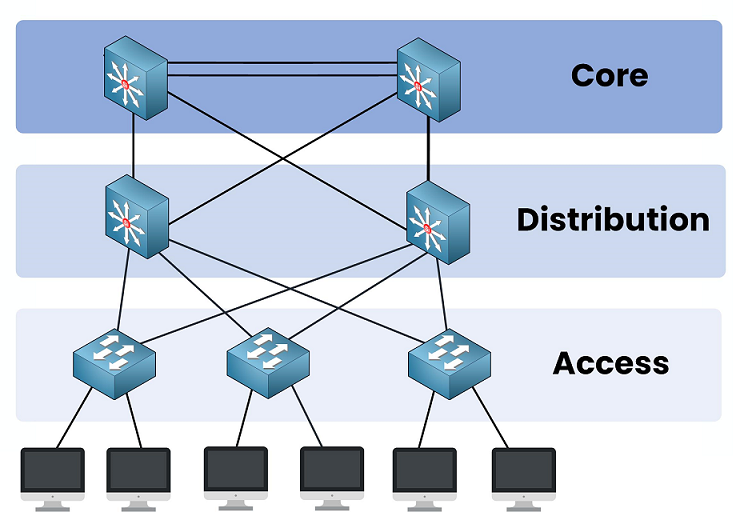
For example, a university may connect classroom computers to access switches, connect those switches to distribution devices, and use a core network to link buildings and data centers.
Features:
- Divides the network into manageable layers.
- Supports structured traffic flow and policy enforcement.
- Allows network designers to plan capacity at different levels.
- Can provide redundancy through appropriate device and link design.
Advantages:
- Makes large networks easier to organize.
- Supports scalability and structured troubleshooting.
- Allows security and routing policies to be applied at appropriate layers.
- Can improve resilience when redundant paths and devices are included.
Disadvantages:
- May require more equipment and configuration.
- Can be unnecessarily complex for small networks.
- Poor layer design can create bottlenecks.
- Redundancy and high availability can increase costs.
Applications: University campuses, corporate offices, hospitals, large educational institutions, and enterprise networks.
Client-Server vs. Peer-to-Peer Architecture
Client-server and peer-to-peer are two important network architectures. The main difference is how resources and services are provided.
Client-Server Architecture | Peer-to-Peer Architecture |
|---|---|
Clients request services from a server. | Peers share resources directly with one another. |
Uses a centralized structure for core services. | Uses a distributed structure among participating peers. |
Generally requires a server for core services. | Does not require a dedicated server for every sharing activity. |
Clients and servers have different roles. | Each peer can act as both a client and a resource provider. |
Resources are usually managed centrally. | Resources are often managed by individual peers or distributed mechanisms. |
May require higher infrastructure and administration costs. | Can reduce the need for dedicated server infrastructure. |
Centralized security controls can simplify administration. | Consistent security management can be more challenging. |
Data may be stored centrally or across multiple servers. | Resources may be distributed across participating peers. |
Server failure can disrupt dependent services if redundancy is absent. | Peer failure may affect the resources available from that peer. |
Can scale by adding servers and increasing capacity. | Scalability depends on peer capacity and participation. |
Server maintenance often requires trained administrators. | Maintenance responsibilities may be distributed among peers. |
Examples: websites, email servers, online banking, and school management systems. | Examples: peer-to-peer file sharing and distributed resource-sharing applications. |
Which is better?
Client-server architecture is often appropriate when centralized administration, consistent access control, and managed data services are important. Peer-to-peer architecture can be suitable when direct resource sharing and distributed participation are priorities. The best choice depends on the application’s security, performance, reliability, and cost requirements.
Real-World Examples of Network Architecture
Network architecture is used in everyday systems and large organizations.
Example 1: School Computer Laboratory
A school may connect computers to network switches and provide internet access through a router and firewall. A server may host shared educational files or applications.
A client-server model can help manage user accounts and shared resources, while a layered network design can simplify expansion as more classrooms are connected.
Example 2: E-Commerce Website
An online shopping website may use a multi-tier application architecture with a web or presentation layer, an application layer, and a database layer.
The system may also use cloud networking, load balancing, monitoring, and security controls to support customers in different countries.
Example 3: Office Network
A business office may use client-server architecture for shared files, email, authentication, and internal applications. Switches connect office devices, while routers and firewalls connect the local network to other networks and the internet.
Larger offices may use a three-tier network design to improve organization and scalability.
Example 4: Cloud-Based Learning Platform
An online learning platform may host videos, notes, user accounts, and assessments on cloud infrastructure. Students access these resources using browsers or mobile applications.
Cloud architecture allows the platform to adjust computing capacity as demand changes, although actual performance depends on application design, network connectivity, and resource configuration.
Advantages of Network Architecture
A properly designed network architecture provides several benefits.
- Improved communication: Defines how devices and applications exchange information.
- Resource sharing: Allows users to share files, printers, applications, and other resources.
- Scalability: Supports network growth when new devices, locations, and services are added.
- Security: Helps organize authentication, authorization, network segmentation, and traffic filtering.
- Reliability: Can reduce service interruptions through redundancy and fault-tolerant design.
- Performance management: Helps identify capacity requirements and avoid bottlenecks.
- Simplified administration: Establishes a clear structure for monitoring, maintenance, and troubleshooting.
- Cost management: Helps organizations select infrastructure appropriate to their needs and budget.
These benefits depend on the quality of the design, implementation, monitoring, and ongoing maintenance.
Disadvantages and Challenges of Network Architecture
Network architecture also presents challenges.
- Initial investment: Network devices, servers, software, and implementation can be expensive.
- Design complexity: Large networks require careful planning and documentation.
- Security risks: Misconfiguration, vulnerable devices, and unauthorized access can compromise services.
- Maintenance requirements: Hardware, software, and security controls need regular updates.
- Performance bottlenecks: Poor capacity planning can cause slow connections and overloaded systems.
- Failure risks: A failed component can interrupt services if redundancy is insufficient.
- Technical expertise: Complex environments require trained professionals to manage and troubleshoot them.
Organizations can reduce these challenges through capacity planning, network documentation, access control, regular updates, monitoring, and appropriate redundancy.
Important Principles of Good Network Architecture
When designing a network, engineers should consider the following principles.
1. Scalability
The network should support future growth without requiring a complete redesign. Designers should estimate future users, devices, bandwidth, and application requirements.
2. Security
Security should be included from the beginning. Use appropriate authentication, least-privilege access, firewalls, secure configurations, network segmentation, and monitoring.
3. Reliability and Redundancy
Critical services may need redundant links, devices, power sources, or servers. Redundancy should be designed and tested to ensure that it actually reduces the impact of failures.
4. Performance
Designers should consider bandwidth, latency, congestion, traffic patterns, and application requirements. Network capacity should match expected workloads.
5. Manageability
Clear documentation, monitoring tools, consistent configurations, and defined responsibilities make networks easier to maintain.
6. Cost Efficiency
Choose equipment, cloud services, and redundancy levels that meet operational requirements without unnecessary spending. Consider long-term maintenance and operating costs, not just initial purchase prices.
7. Availability and Recovery
Important systems should have appropriate backup, recovery, and incident-response procedures. A backup alone does not guarantee that a service can be restored quickly.
Network Architecture vs. Network Topology
Network architecture and network topology are related but different concepts.
Network architecture describes the overall organization of network services, components, roles, communication methods, and design principles.
Network topology describes how network devices and connections are arranged, either physically or logically.
Network Architecture | Network Topology |
|---|---|
Network architecture describes the overall design and structure of a computer network. | Network topology describes how devices and connections are arranged in a network. |
It defines how network components communicate and provide services. | It shows how network devices are interconnected. |
It includes network roles, services, protocols, and design models. | It includes the physical or logical arrangement of devices and links. |
It focuses on the overall organization and operation of the network. | It focuses on the arrangement and connection of network components. |
Examples: Client-server, peer-to-peer, and three-tier architecture. | Examples: Star, bus, ring, mesh, and tree topology. |
It helps determine how network services and resources are organized. | It helps determine how devices communicate through network connections. |
It influences security, scalability, management, and performance. | It influences connectivity, fault isolation, and the effect of link failures. |
It is used when planning the overall network design. | It is used when planning the physical or logical arrangement of network connections. |
Example: A school may use client-server architecture to manage student data and a star topology to connect classroom computers to a central switch.
Conclusion: Network architecture defines the overall organization of a network, while network topology describes how its devices and connections are arranged.
Read more about Computer Network and Types of Computer Networks.
Frequently Asked Questions (FAQs)
1. What is network architecture in simple words?
Network architecture is the plan that explains how computers, servers, networking devices, and applications are organized and communicate with one another.
2. What are the main types of network architecture?
Common types and patterns include client-server, peer-to-peer, hybrid, centralized, decentralized, cloud-based, and three-tier architecture. These categories overlap, and other architectures are used for specific applications.
3. What is the difference between client-server and peer-to-peer architecture?
In client-server architecture, clients typically request services from dedicated servers. In peer-to-peer architecture, participating devices can share resources directly with one another.
4. Why is network architecture important?
Network architecture helps organizations plan communication, security, performance, resource sharing, scalability, and reliability. A suitable design also makes maintenance and troubleshooting easier.
5. What is cloud-based network architecture?
Cloud-based network architecture uses cloud infrastructure and services to connect applications, users, and computing resources. It can provide flexible capacity and access across different locations.
6. What is three-tier network architecture?
Three-tier network architecture divides an enterprise network into access, distribution, and core layers. This structure supports organized connectivity, policy enforcement, and network growth.
7. What is the difference between network architecture and network topology?
Network architecture describes the overall design and organization of network components and services. Network topology describes how network devices and links are arranged.
8. Which network architecture is best for a business?
The best architecture depends on the size of the business, application requirements, security needs, budget, and expected growth. Many businesses use a combination of client-server services, layered network design, and cloud infrastructure.
Conclusion
Network architecture is an essential part of computer networking because it defines how devices, services, and applications communicate and share resources. Client-server, peer-to-peer, hybrid, centralized, decentralized, cloud-based, and three-tier approaches address different requirements.
A suitable network architecture should balance security, performance, scalability, reliability, manageability, and cost. Understanding these approaches helps students, IT professionals, and organizations make informed decisions when building and maintaining computer networks.
For more networking tutorials and educational notes, explore the related articles on Computer Networking Devices and Types of Computer Networks.
About the Author
Er. Basant Kumar Yadav is an engineering professional and instructor at Shree Secondary School Dudhiawa, Rautahat, Nepal. He creates educational resources covering computer engineering, programming, digital electronics, web development, and information technology to help students and readers understand technical concepts in simple language.
Visit basantyadav.com.np for more computer engineering notes, tutorials, and learning resources.